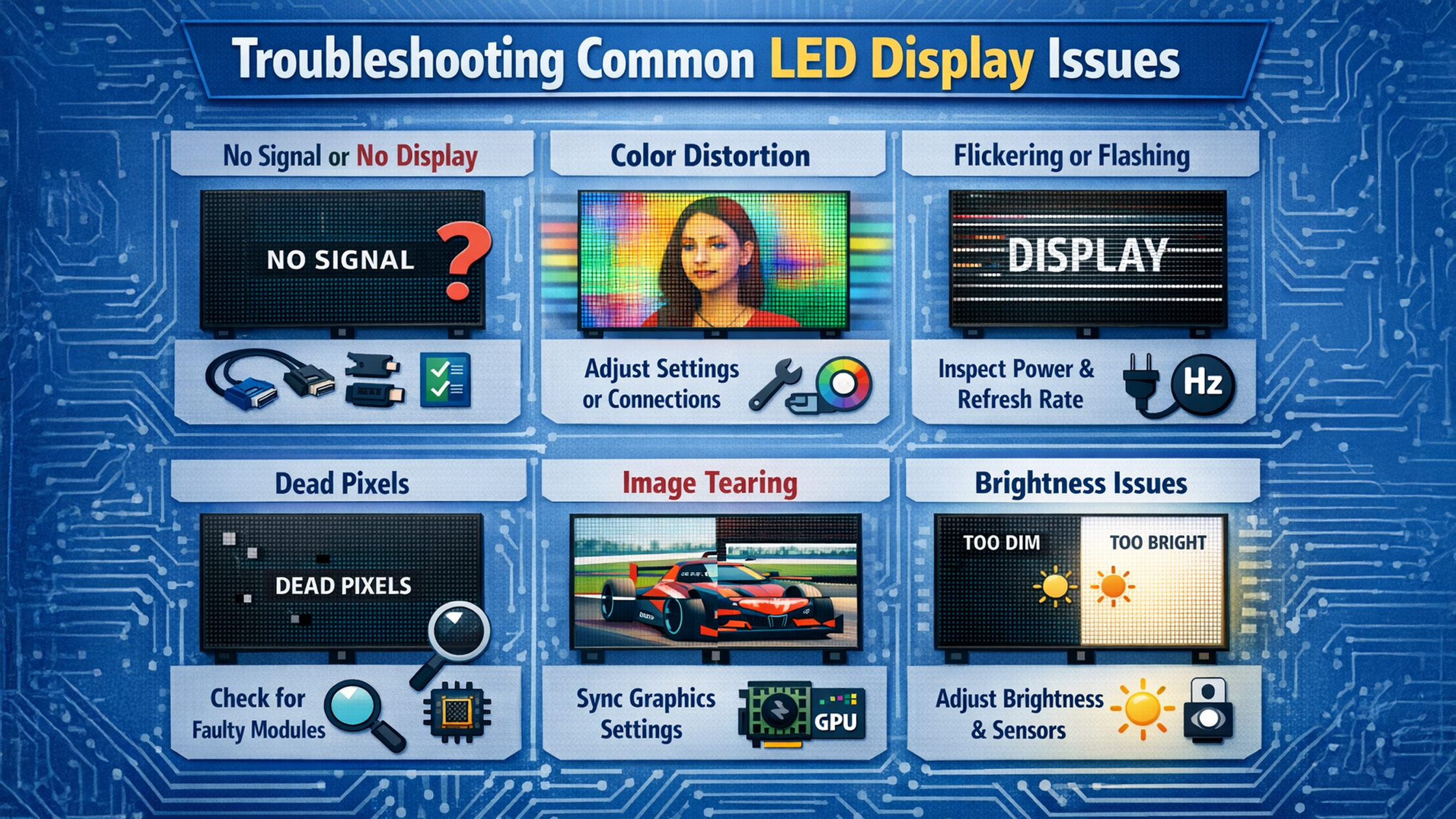
LED displays and interactive digital boards are now essential for smart classrooms, corporate meetings, coaching institutes, and online teaching studios across India. Whether you're using an Evota Smart Board, Maxhub Smart Board, or LG Interactive Digital Board, occasional technical issues can occur. At GoLive eTechnologies India Private Limited, we help schools, institutes, and businesses resolve LED display issues quickly while providing reliable products like Evota interactive panels, Newline digital boards, PTZ cameras, and online class studio setups. Below are the most common LED display problems and practical solutions.
1. No Display or Blank Screen on Digital Board
A blank screen is one of the most common problems users face with digital panel boards and interactive flat panels.
Possible Causes
Loose HDMI or OPS connection
Power supply interruption
Faulty display input source
Software crash
How to Fix It
Check HDMI or OPS cables connected to the panel
Restart the digital board and connected PC
Verify the input source on the display
Update the panel firmware
For example, boards like the Evota Interactive Panel and Newline Interactive Panel include multiple HDMI inputs and OPS slots that must be configured correctly.
Tip: If the issue persists, professional support from GoLive eTechnologies can diagnose hardware faults quickly.
2. Touch Screen Not Responding
Touch issues can disrupt teaching or presentations, especially when using interactive panels for education.
Causes
Touch driver malfunction
Dirty screen surface
Incorrect calibration
Software lag
Troubleshooting Steps
• Clean the display surface with a microfiber cloth
• Restart the panel system
• Recalibrate the touch settings
• Update touch drivers
Interactive boards like the Evota Digital Board and Maxhub Digital Board come with multi-touch capabilities, allowing teachers to write using stylus pens or fingers.
Many educators also use accessories like computer writing pads or USB writing pads for computers when presenting through PCs connected to digital boards.
3. Poor Image Quality or Pixelated LED Screen
Low image quality can affect presentations, classroom visuals, and video conferencing.
Common Reasons
Incorrect display resolution
Faulty HDMI cable
Weak graphics source
Panel brightness settings
Solutions
Set the display resolution to 4K (if supported)
Replace old HDMI cables
Adjust brightness and contrast settings
Update graphic drivers on connected PCs
Premium panels such as the LG Smart Board and Newline Smartboard deliver superior visual clarity for teaching, training, and collaboration.
4. Audio Issues in Online Classes or Presentations
Audio problems are common in online teaching studio setups.
Possible Causes
Incorrect microphone settings
Faulty speakers
Software audio configuration errors
Fixes
• Check microphone input settings
• Verify speaker output device
• Restart conferencing software
• Update audio drivers
Many classrooms integrate external audio systems such as Ahuja amplifiers, wireless microphones for teachers, and conference speakers to improve audio clarity.
5. PTZ Camera Not Working with LED Display Setup
Modern classrooms and conference rooms often include PTZ cameras for hybrid meetings and online classes.
Popular devices include:
Evota 4K PTZ Camera
Logitech PTZ Pro 2
Sony NX80
Common Problems
Camera not detected
USB capture device error
HDMI capture card malfunction
Solutions
Install proper HDMI video capture device software
Check USB connections
Restart the camera driver
Update OBS or streaming software
A properly configured online class studio setup ensures smooth hybrid teaching and live streaming.
Choosing the Right Digital Board to Avoid Issues
Buying a high-quality interactive panel reduces technical problems and improves teaching experience.
At GoLive eTechnologies, popular products include:
Evota Smart Boards
65", 75", and 86" interactive panels
4K UHD display
Multi-touch technology
Built-in Android system
Typical searches include Evota smart board price, Evota digital board price, and Evota smart board 75 inch price.
Maxhub Interactive Panels
The Maxhub digital board is widely used in corporate and education sectors.
Benefits include:
• Ultra-smooth writing
• Wireless screen sharing
• Integrated conferencing tools
Users often search for Maxhub smart board price in India and Maxhub digital board 100 inch price.
LG Interactive Panels
High-end education institutions prefer LG interactive flat panels for their display quality.
Popular queries include:
LG interactive digital board price India
LG smart board 75 inch price
LG digital board 65 inch price
Why Buy Digital Boards from GoLive eTechnologies?
Choosing a trusted supplier is as important as choosing the right product.
GoLive eTechnologies offers:
Genuine products with manufacturer warranty
Competitive digital board price in India
Installation support across India
Studio setup for online classes
PTZ cameras, capture cards, microphones, and smart classroom equipment
With thousands of satisfied customers, GoLive eTechnologies reviews highlight reliability, support, and competitive pricing.
Use Cases of LED Interactive Displays
Interactive digital boards are widely used in:
Schools & Colleges
Smart classrooms improve engagement and visual learning.
Coaching Institutes
Teachers can explain complex concepts using digital annotations.
Corporate Meetings
Interactive panels enhance collaboration and presentations.
Online Teaching Studios
Combined with PTZ cameras and ring lights, digital boards enable professional remote teaching.
Final Thoughts
LED interactive displays are transforming education and business collaboration across India. While occasional issues like touch malfunction, display problems, or camera connectivity can occur, most problems can be resolved quickly with proper troubleshooting.
By choosing reliable brands like Evota, Maxhub, LG, and Newline, and purchasing from GoLive eTechnologies, institutions can ensure long-term performance and professional support.
Your email address will not be published. Required fields are marked *

By Inhype • May 18, 2026
India’s education landscape is rapidly evolving, and Maker Culture is at the center of this transformation. In 2025, schools, coaching institutes, a
Read More
By Inhype • May 18, 2026
Introduction: The Rise of Student-Driven Learning Education in India is rapidly shifting from passive instruction to active, student-centered learn
Read More
By Inhype • May 18, 2026
In today’s smart classrooms, digital storytelling tools like interactive panels, PTZ cameras, and digital boards are transforming education. However
Read More
By Inhype • May 18, 2026
In today’s rapidly evolving education ecosystem, digital storytelling has become a powerful teaching strategy. From smart classrooms to hybrid learn
Read More
By Inhype • May 18, 2026
In today’s fast-evolving education landscape, teachers are expected to do more than ever—deliver engaging lessons, manage hybrid classrooms, and a
Read More


Golive eTechnologies India Private Limited (CIN - U31909UP2021PTC148242) is one of India's leading providers of smart classrooms, interactive boards, video conferencing solutions, and display technologies for the education, healthcare, corporate, and government sectors.
No comments yet. Be the first to comment!