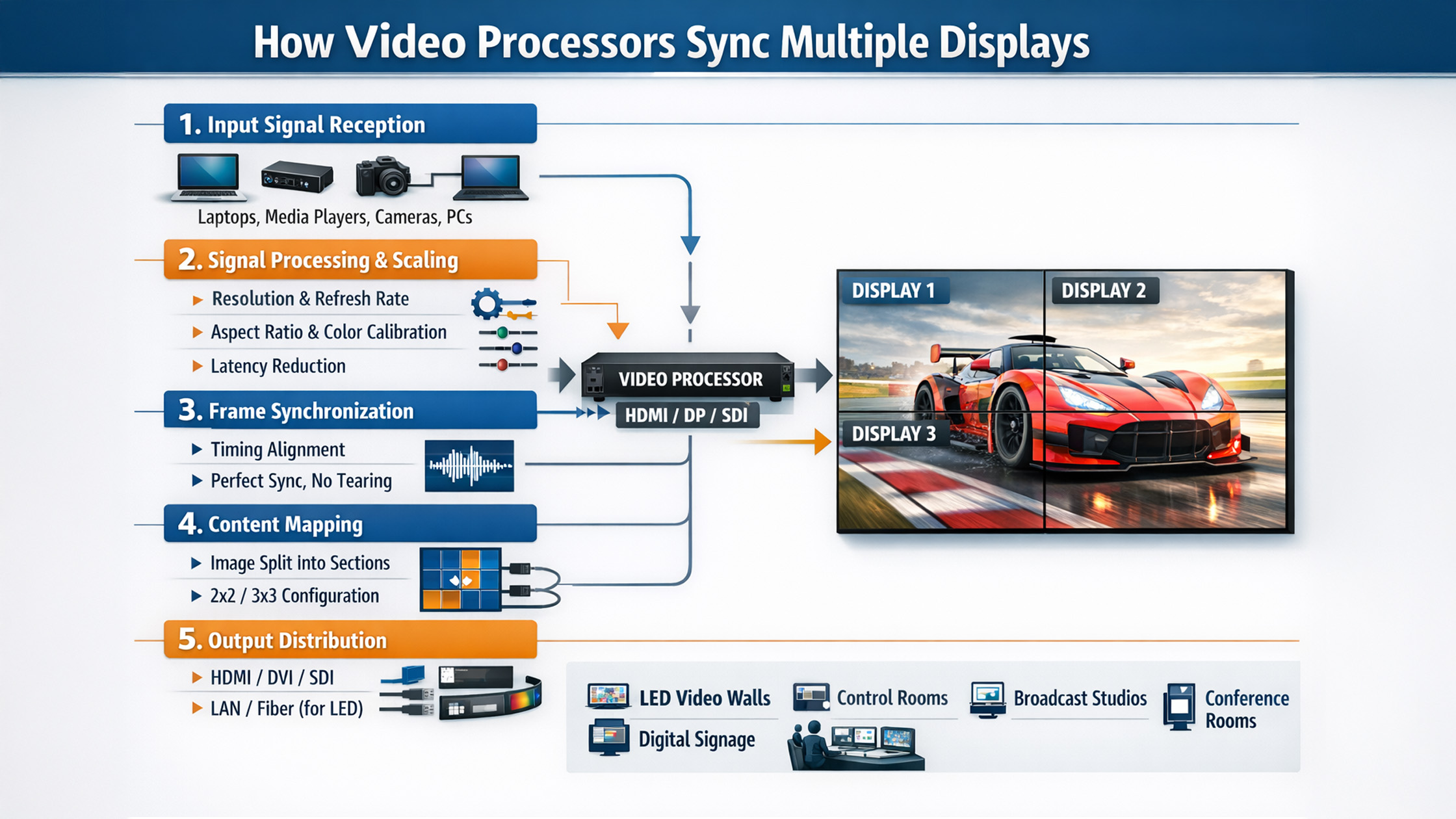
In today’s digital-first world, seamless multi-screen experiences are essential for smart classrooms, corporate meetings, live events, and online teaching studios. Whether you’re using a digital board, interactive panel, or a PTZ camera setup, synchronization across multiple displays plays a critical role in delivering a smooth and professional experience. At golive etechnologies india private limited, advanced video processors and smart display solutions are designed to ensure perfect screen synchronization—making them ideal for education, business, and hybrid environments across India.
What is a Video Processor?
A video processor is a device that manages, scales, and distributes video signals across multiple screens such as:
Interactive flat panels
Digital panel boards
LED video walls
Smart classroom displays
It ensures that all connected displays show perfectly aligned visuals without lag or distortion.
How Video Processors Sync Multiple Displays
1. Signal Distribution & Cloning
Video processors duplicate a single input (like a laptop or camera feed) across multiple displays.
Example Use Case:
Teaching using an evota smart board while projecting the same content on multiple screens in a classroom.
2. Resolution Scaling
Different screens may have different resolutions (e.g., 4K vs Full HD). A processor adjusts the output to match each display.
Works seamlessly with:
lg interactive digital board
newline interactive panel
maxhub digital board
3. Frame Synchronization
To avoid delays or screen tearing, processors align the frame rate across all displays.
Essential for:
Live streaming setups
Online classes using evota 4k ptz camera
Conference rooms using logitech ptz pro 2
4. Video Wall Processing
For large setups, processors divide a single image across multiple screens.
Common in:
Corporate offices
Events
Smart classroom installations
5. Input Switching & Control
Switch between multiple inputs like:
Laptop
Camera (e.g., evota camera, sony nx80 price in india range cameras)
HDMI capture devices
Using hdmi video capture device software, users can manage multiple sources efficiently.
Why Synchronization Matters in India’s Smart Classrooms
With the rise of smart classes in India, synchronized displays improve:
Student engagement
Teaching clarity
Hybrid learning efficiency
Professional presentation quality
Using products like:
evota interactive panel
maxhub smart board
lg smart board 75 inch
ensures lag-free, high-quality visual delivery.
GoLive eTechnologies Solutions for Multi-Display Sync
At golive etechnologies, you get complete solutions—not just devices.
Interactive Panels & Digital Boards
evota digital board
newline digital board 75 inch price
lg digital board 65 inch price
Ideal for:
Schools
Coaching centers
Corporate training rooms
PTZ Cameras for Live Sync
evota 10x hd ptz camera
evota 4k ptz camera price
logitech ptz camera
Perfect for:
Online teaching setup
Lecture recording
Hybrid classrooms
Video Processing & Studio Setup
Vision mixers
Capture cards
Studio setup for online classes
Combine with:
ring light
wireless mic for teachers
ahuja amplifier dpa770
Pricing Insights (India Market Focus)
Prices vary based on features, size, and brand:
|
Product Category |
Approx Price Range |
|---|---|
|
Digital Board Price in India |
₹50,000 – ₹4,50,000 |
|
Evota Smart Board 75 Inch Price |
Competitive mid-range |
|
LG Interactive Panel Price |
Premium segment |
|
Maxhub Smart Board Price in India |
Mid to high range |
|
PTZ Camera Price |
₹25,000 – ₹2,00,000 |
Searching for digital board price under 5000? Those are basic writing pads like:
usb writing pad for computer
writing pad for pc
Benefits of Choosing GoLive eTechnologies
End-to-End Solutions
From digital board images to full smart classroom setup
Trusted Brand Presence
Strong golive etechnologies reviews across India
Wide Product Range
Includes:
evota screen
maxhub education board price solutions
lg interactive panel 75 inch price
Affordable Pricing
Best value for:
Schools
Coaching institutes
Businesses
Use Cases of Multi-Display Sync
Smart Classrooms
Multiple displays for large classrooms
Interactive teaching with digital writing board
Corporate Meetings
Seamless presentations
Multi-screen dashboards
Online Teaching Studios
Combine:
green mat shooting
lecture capture camera
teleprompter kya hai in hindi setups
Tips for Best Multi-Display Performance
Use high-quality HDMI cables
Ensure compatible resolutions
Invest in reliable processors
Use proper lighting (e.g., ring light for video)
Optimize audio using microphone for teaching online
Final Thoughts
Synchronizing multiple displays is no longer a luxury—it’s a necessity for modern education and business environments. With the right combination of:
interactive panels
ptz cameras
video processors
you can deliver a seamless, professional experience.
golive technologies provides complete, scalable, and affordable solutions tailored for India’s growing digital ecosystem.
Your email address will not be published. Required fields are marked *

By Inhype • May 16, 2026
Transform Classrooms with Collaborative Planning & Smart Digital Tools In today’s evolving education landscape, collaborative planning is no long
Read More
By Inhype • May 16, 2026
In today’s rapidly evolving education landscape, digital transformation has redefined how teachers teach and students learn. From smart classrooms t
Read More
By Inhype • May 16, 2026
From Chalk to Click: A Practical Guide for Teachers in India If you’ve ever felt overwhelmed by technology in classrooms, you’re not alone. Man
Read More
By Inhype • May 16, 2026
Modernize Classrooms Before June Reopening: A Step-by-Step Summer Transition Guide As schools and coaching centres across India prepare for the Jun
Read More
By Inhype • May 16, 2026
In today’s rapidly evolving education landscape, predictive analytics is no longer optional—it’s essential. Schools, coaching centres, and unive
Read More


Golive eTechnologies India Private Limited (CIN - U31909UP2021PTC148242) is one of India's leading providers of smart classrooms, interactive boards, video conferencing solutions, and display technologies for the education, healthcare, corporate, and government sectors.
No comments yet. Be the first to comment!