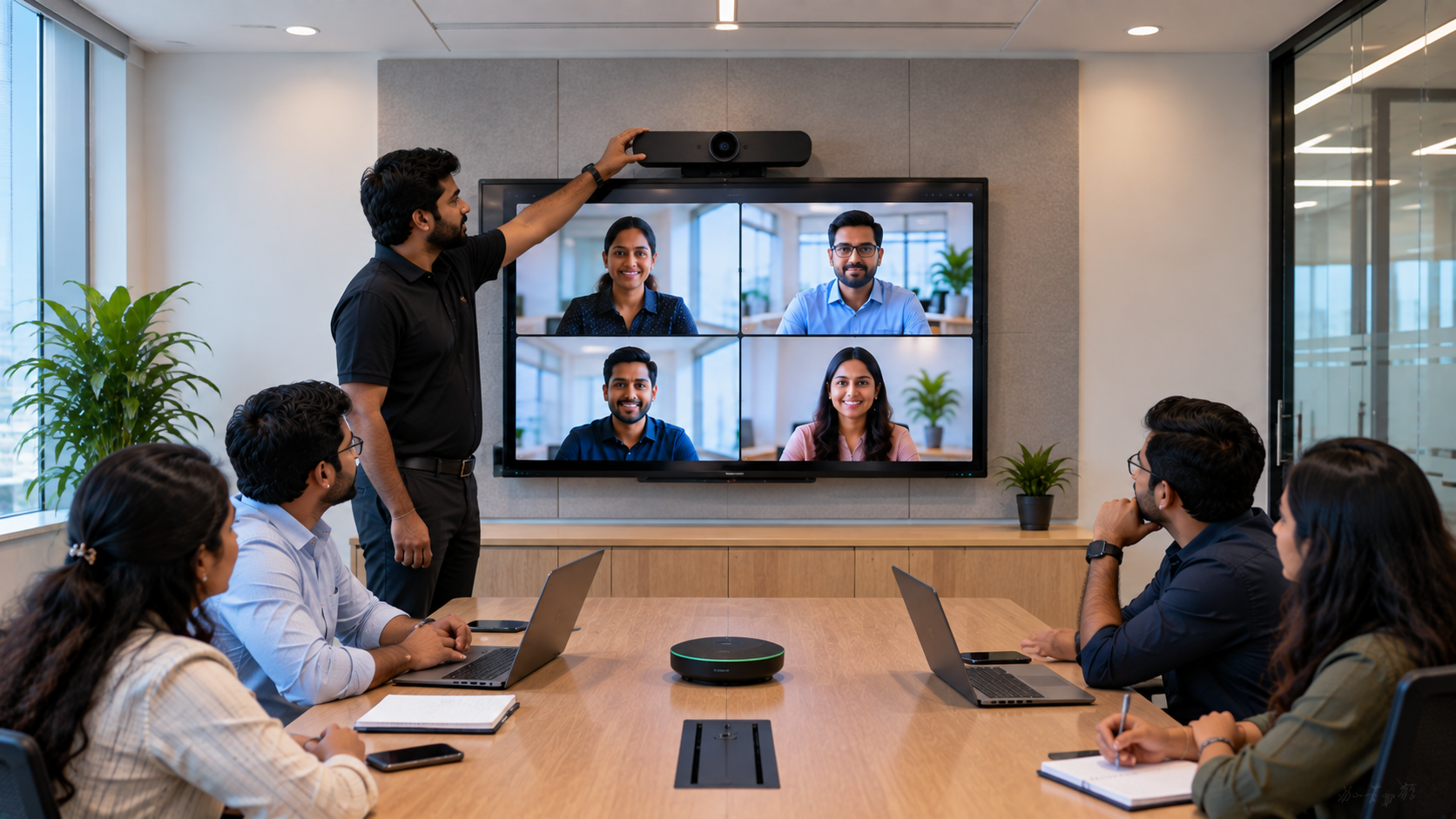
A professional conference room is only as effective as the technology supporting it. Whether your organisation conducts client meetings, hybrid conferences, board meetings, training sessions, webinars, or remote collaboration, camera placement plays a critical role in video quality and participant engagement. The right PTZ camera, interactive display, microphone and speaker setup can turn an ordinary meeting room into a reliable hybrid collaboration space. However, simply installing a high-quality camera is not enough. Its position, height, viewing angle, lighting and distance from participants all affect the final video. At GoLive eTechnologies, we help businesses and institutions select, install and deploy the right technology for their requirements—with support beyond installation. Our approach is simple: the right solution, fast deployment, professional installation and dependable support.
Why Is Conference Room Camera Placement Important?
A poorly positioned camera can create several problems:
Participants appear too small or too far away.
People sitting at the sides may be outside the frame.
The camera may capture excessive ceiling or table space.
Backlighting can make faces appear dark.
Participants may need to constantly adjust their position.
Remote attendees may struggle to follow conversations.
A correctly installed conference room camera provides a balanced view of the room and makes remote participants feel more naturally included in the meeting.
For larger conference rooms, a PTZ camera is particularly useful because it can pan, tilt and zoom to capture different participants and areas of the room.
Where Should You Place a Conference Room Camera?
There is no single position that works for every conference room. The ideal placement depends on room size, table configuration, seating capacity, display position and the type of meetings conducted.
1. Place the Camera Facing the Main Display
For most conference rooms, positioning the camera near or below the main interactive display is an excellent starting point.
This creates a more natural perspective because remote participants see the speaker and the presentation screen from approximately the same direction.
If your room uses an Evota interactive panel, MAXHUB smart board, Newline interactive panel or LG interactive display, the camera can be integrated into the overall AV layout.
This setup is particularly useful for:
Board meetings
Client presentations
Hybrid classrooms
Training rooms
Corporate conference rooms
Online seminars
Webinar studios
2. Keep the Camera at Eye Level
Camera height has a major effect on how professional the meeting appears.
A camera mounted too high may point downward toward participants, while a camera placed too low can create an unnatural upward angle.
For a typical conference room, aim to position the primary camera approximately at seated eye level or slightly above it, depending on the room layout.
For larger rooms where participants are seated farther away, a PTZ camera mounted higher can provide better coverage when combined with appropriate tilt and zoom.
3. Choose the Right Distance
The camera should be far enough away to capture the required seating area without excessive digital zoom.
For smaller rooms, a compact 4K USB camera may be sufficient. For medium and large conference rooms, a 4K PTZ camera provides greater flexibility.
For example, an Evota 4K PTZ Camera can be considered when organisations need a professional video solution with remote positioning and zoom capabilities.
The correct camera should be selected according to:
Room dimensions
Number of participants
Seating arrangement
Required field of view
Display location
Lighting conditions
Meeting platform
Recording requirements
Rather than choosing equipment based only on specifications, GoLive eTechnologies helps customers match the technology to the actual room.
4. Consider a PTZ Camera for Large Conference Rooms
PTZ means Pan-Tilt-Zoom.
A PTZ camera can move horizontally and vertically while zooming into specific areas of the room.
This makes PTZ cameras particularly useful for larger meeting environments.
PTZ cameras are useful for:
Corporate boardrooms
Training centres
Universities
Hybrid classrooms
Webinar rooms
Online teaching studios
Government and institutional meeting rooms
Conference and seminar halls
Products such as Evota 4K PTZ Camera, Evota 10X HD PTZ Camera and other professional PTZ solutions can be evaluated according to the room's requirements.
If you're comparing options such as an Evota camera, Logitech PTZ camera or other professional camera systems, consider the complete installation rather than camera price alone.
5. Avoid Direct Window Light Behind Participants
One of the most common conference room camera mistakes is placing the camera opposite a bright window.
When strong sunlight enters behind participants, the camera may expose for the bright background, making people's faces appear dark.
Whenever possible:
Camera → Participants → Display
is preferable to:
Camera → Window → Participants
If windows cannot be avoided, consider blinds, curtains or controlled lighting.
Good lighting is especially important when using conference cameras for webinars, online class studio setup, lecture recording or professional video production.
6. Keep the Conference Table in the Camera's Field of View
The objective isn't necessarily to capture the entire room.
The camera should capture the people participating in the meeting.
For rectangular conference tables, position the camera so that the people seated along the longer sides remain visible.
For larger rooms, a single camera may not provide sufficient coverage. Multiple cameras, an appropriate video switcher and professional AV integration may be required.
GoLive eTechnologies can help organisations evaluate the complete requirement instead of treating the camera as an isolated product.
Conference Room Camera Placement: Quick Comparison
|
Room Type |
Recommended Camera Approach |
Typical Use |
|---|---|---|
|
Small meeting room |
USB/4K camera |
Team meetings |
|
Medium conference room |
PTZ/4K camera |
Hybrid meetings |
|
Large boardroom |
PTZ + professional audio |
Corporate meetings |
|
Training room |
PTZ + interactive display |
Training |
|
Hybrid classroom |
PTZ + interactive panel |
Teaching |
|
Webinar/recording room |
PTZ + lighting + audio |
Streaming |
Combine Your Camera With the Right Conference Room Technology
A camera works best as part of an integrated AV environment.
Depending on your requirement, a conference room solution can include:
Evota 4K PTZ Camera
Evota interactive panel
MAXHUB smart board
Newline interactive panel
LG interactive panel
Conference room speakers
Wireless microphone
HDMI video capture device
Video switcher
Display or interactive flat panel
Appropriate mounting kit
Installation and configuration services
For organisations building an online teaching setup, hybrid classroom or teaching studio, additional equipment such as lighting, microphones, capture devices and recording systems may also be required.
Camera Placement for Interactive Displays
If your conference room has a 65-inch, 75-inch or 86-inch interactive flat panel, camera placement needs additional planning.
The camera should not be positioned so that the display blocks the participants or causes the camera to point excessively upward or downward.
Solutions from brands such as Evota, MAXHUB, Newline and LG can be considered based on the required display size, features and budget.
Instead of focusing only on searches such as Newline smart board price, LG interactive digital board price India, MAXHUB smart board price in India or Evota smart board price, organisations should evaluate the complete solution—including installation, compatibility and after-sales support.
How GoLive eTechnologies Helps With Conference Room Setup
Buying technology online is only the first step.
At GoLive eTechnologies India Private Limited, our approach focuses on making technology work in the real environment.
Our end-to-end support can help customers with:
Selection → Configuration → Installation → Deployment → Training → Support
This means customers don't have to figure everything out themselves.
Our brand promise is:
Technology that works, backed by people who help.
The goal is simple: less technology headache and more confidence that everything will work.
This approach is particularly valuable for businesses, schools, colleges, coaching centres and institutions that need technology deployed quickly and reliably.
What to Check Before Installing a Conference Camera
Before purchasing a conference camera, check:
Room dimensions
Number of participants
Seating arrangement
Camera-to-subject distance
Required field of view
PTZ/zoom requirements
Display position
Natural and artificial lighting
Microphone placement
Speaker placement
Video conferencing platform compatibility
Installation requirements
Future expansion requirements
A professional assessment can prevent costly repositioning or equipment replacement later.
Final Takeaway
The best camera placement for a conference room is the position that gives remote participants a clear, natural and stable view of everyone involved.
For small rooms, a high-quality USB or 4K camera may be sufficient. For medium and large conference rooms, a PTZ camera can provide greater flexibility and coverage.
But the best result comes from treating the camera, display, audio, connectivity and installation as one complete technology solution.
Whether you're looking for an Evota 4K PTZ Camera, interactive panel, conference room audio system or complete hybrid meeting setup, GoLive eTechnologies can help you select the right technology and get it deployed with professional installation and ongoing assistance.
The right solution. Fast deployment. Installation. Support. Peace of mind.
Your email address will not be published. Required fields are marked *

By Inhype • September 12, 2026
A smart classroom is only as effective as the technology supporting it. Interactive panels, smart boards, PTZ cameras, microphones, speakers, PCs and
Read More
By Inhype • September 12, 2026
Higher education is rapidly moving beyond traditional chalkboards and projectors. Today, colleges and universities need technology that supports inter
Read More
By Inhype • September 12, 2026
A smart classroom for CBSE schools is no longer simply a classroom with a digital board. Modern schools are building connected learning environments t
Read More
By Inhype • September 12, 2026
Planning a smart classroom project for 10, 20 or even 50 classrooms requires more than simply purchasing digital boards. Schools, colleges, universiti
Read More
By Inhype • September 12, 2026
A smart classroom can transform the way teachers explain concepts, students interact with lessons, and institutions deliver digital education. From in
Read More




Golive eTechnologies India Private Limited (CIN - U31909UP2021PTC148242) is one of India's leading providers of smart classrooms, interactive boards, video conferencing solutions, and display technologies for the education, healthcare, corporate, and government sectors.





















No comments yet. Be the first to comment!