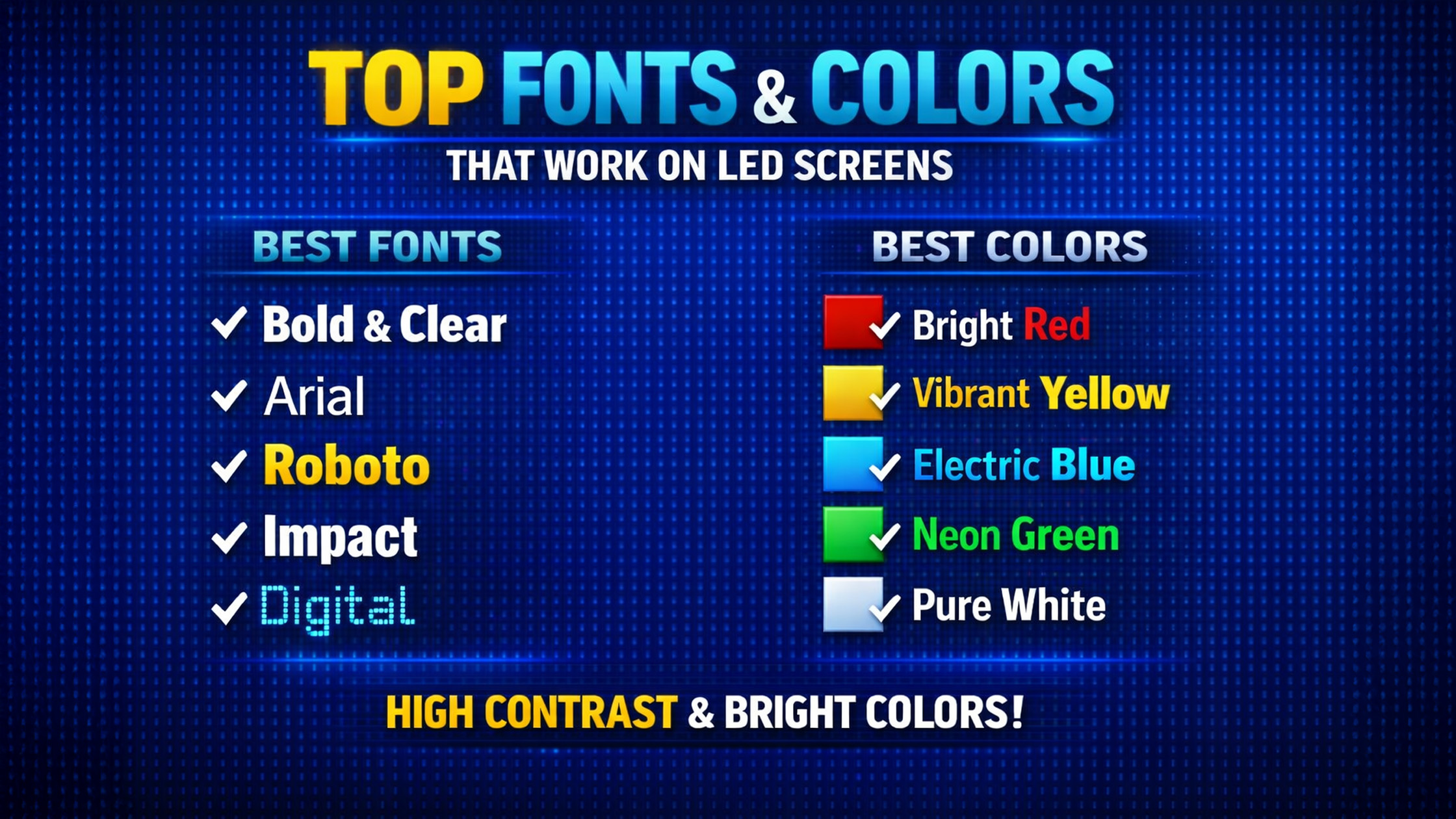
LED screens and interactive digital boards are transforming education, business presentations, and online teaching studios across India. Whether you're using a Evota Smart Board, Maxhub Smart Board, or LG Interactive Digital Board, the fonts and colors you use can significantly affect readability and engagement. At GoLive eTechnologies India Private Limited, we help schools, coaching institutes, and corporate offices choose the best digital panel board solutions. But hardware is only half the story — the right visual design makes your LED screen content truly effective. This guide explains the best fonts and color combinations for LED screens, ensuring your presentations, digital classrooms, and online courses look professional and easy to read.
Why Fonts & Colors Matter on LED Screens
LED displays such as Evota Interactive Panel, Newline Interactive Panel, and LG Interactive Panel use pixel-based lighting. Poor font or color choices can cause:
Eye strain for students
Difficult reading in large classrooms
Poor visibility during video recordings
Reduced engagement in smart classes
Choosing the right typography and colors ensures clear communication, especially in smart classrooms, hybrid classes, and online teaching studio setups.
Best Fonts for LED Screens
When designing content for digital boards for teaching, use simple, bold, and high-contrast fonts.
1. Sans Serif Fonts (Best for Digital Displays)
Sans serif fonts are the most readable on LED screens.
Recommended fonts:
Arial
Helvetica
Open Sans
Roboto
Verdana
These fonts work perfectly on digital board presentations, PowerPoint slides, and interactive flat panel displays.
Teachers using Evota Smart Board 75 Inch or LG Smart Board 75 Inch will notice significantly better clarity with sans-serif fonts.
2. Bold Fonts for Classroom Visibility
Large classrooms require high visibility fonts.
Best choices include:
Montserrat Bold
Roboto Bold
Arial Black
These fonts are ideal for:
Smart class education
Digital smart classrooms
Coaching institute presentations
When used with large digital boards like the Newline Digital Board, bold fonts ensure readability from the last bench.
3. Avoid Decorative Fonts
Avoid fonts like:
Script fonts
Handwritten fonts
Thin serif fonts
They may look attractive but perform poorly on interactive LED panels and smart boards for teaching.
Best Color Combinations for LED Screens
Color contrast is essential for visibility on LED interactive panels and digital classroom displays.
1. White Text on Dark Background
Best for:
Video lectures
Online classes
Recording tutorials
Example:
White text + dark blue background.
This works great on Evota Digital Board and Maxhub Digital Board displays.
Benefits:
High readability
Reduced glare
Professional presentation
2. Dark Text on Light Background
Best for:
Classroom presentations
Teaching slides
Training sessions
Example combinations:
Black text + white background
Dark blue text + light grey background
These combinations are widely used in smart classroom setups across India.
3. Yellow & White for Highlighting
Highlight key points using:
Yellow text
White text
Light green accents
Teachers using digital boards for classroom teaching can highlight formulas, keywords, and definitions effectively.
Ideal Font Sizes for LED Screens
For 75-inch digital boards such as the Evota Smart Board or Newline Smart Board:
Recommended sizes:
Title: 48–72 pt
Headings: 32–40 pt
Body text: 24–28 pt
This ensures visibility even in large classrooms and conference halls.
Smart Classroom Tip: Use Visual Contrast
Modern interactive flat panel displays such as LG Interactive Digital Board 75 Inch support 4K resolution.
Use:
Bold headings
Limited text
High contrast colors
This improves student engagement and comprehension.
Best LED Display Solutions from GoLive eTechnologies
If you're planning to upgrade your classroom, studio, or conference room, GoLive Technologies offers premium smart boards and digital teaching equipment.
Popular Products
Evota Smart Board
Advanced touch screen technology
Perfect for smart classrooms
Competitive evota smart board price
Maxhub Digital Board
High-performance display
Ideal for hybrid classrooms
Affordable maxhub smart board price in India
Newline Interactive Panel
Excellent for corporate training
Powerful collaboration tools
Competitive newline digital board price
LG Interactive Digital Board
Premium display quality
Reliable brand technology
Competitive lg interactive digital board price in India
Ideal Setup for Online Teaching Studios
Combine your digital board with:
Evota 4K PTZ Camera
Logitech PTZ Pro 2
Professional microphones
Studio lighting
This creates a complete online class studio setup for coaching institutes and educators.
Why Buy Digital Boards from GoLive eTechnologies?
Thousands of schools and coaching institutes trust GoLive eTechnologies for smart classroom solutions.
Key advantages:
Genuine products from trusted brands
Competitive digital board price in India
Installation support
Pan-India delivery
Excellent golive etechnologies reviews
You can explore the Evota official website or purchase directly from GoLive eTechnologies’ online store.
Final Thoughts
The effectiveness of a digital board for teaching depends not only on the hardware but also on how content is displayed.
By using:
Clear sans-serif fonts
High contrast color combinations
Proper font sizes
you can dramatically improve readability and engagement on interactive LED panels.
If you're planning to upgrade your smart classroom, coaching centre, or corporate training room, explore the latest Evota, LG, Maxhub, and Newline digital boards available at GoLive eTechnologies India Private Limited.
Your email address will not be published. Required fields are marked *
By Inhype • September 12, 2026
A smart classroom is only as effective as the technology supporting it. Interactive panels, smart boards, PTZ cameras, microphones, speakers, PCs and
Read More
By Inhype • September 12, 2026
Higher education is rapidly moving beyond traditional chalkboards and projectors. Today, colleges and universities need technology that supports inter
Read More
By Inhype • September 12, 2026
A smart classroom for CBSE schools is no longer simply a classroom with a digital board. Modern schools are building connected learning environments t
Read More
By Inhype • September 12, 2026
Planning a smart classroom project for 10, 20 or even 50 classrooms requires more than simply purchasing digital boards. Schools, colleges, universiti
Read More
By Inhype • September 12, 2026
A smart classroom can transform the way teachers explain concepts, students interact with lessons, and institutions deliver digital education. From in
Read More



Golive eTechnologies India Private Limited (CIN - U31909UP2021PTC148242) is one of India's leading providers of smart classrooms, interactive boards, video conferencing solutions, and display technologies for the education, healthcare, corporate, and government sectors.




No comments yet. Be the first to comment!