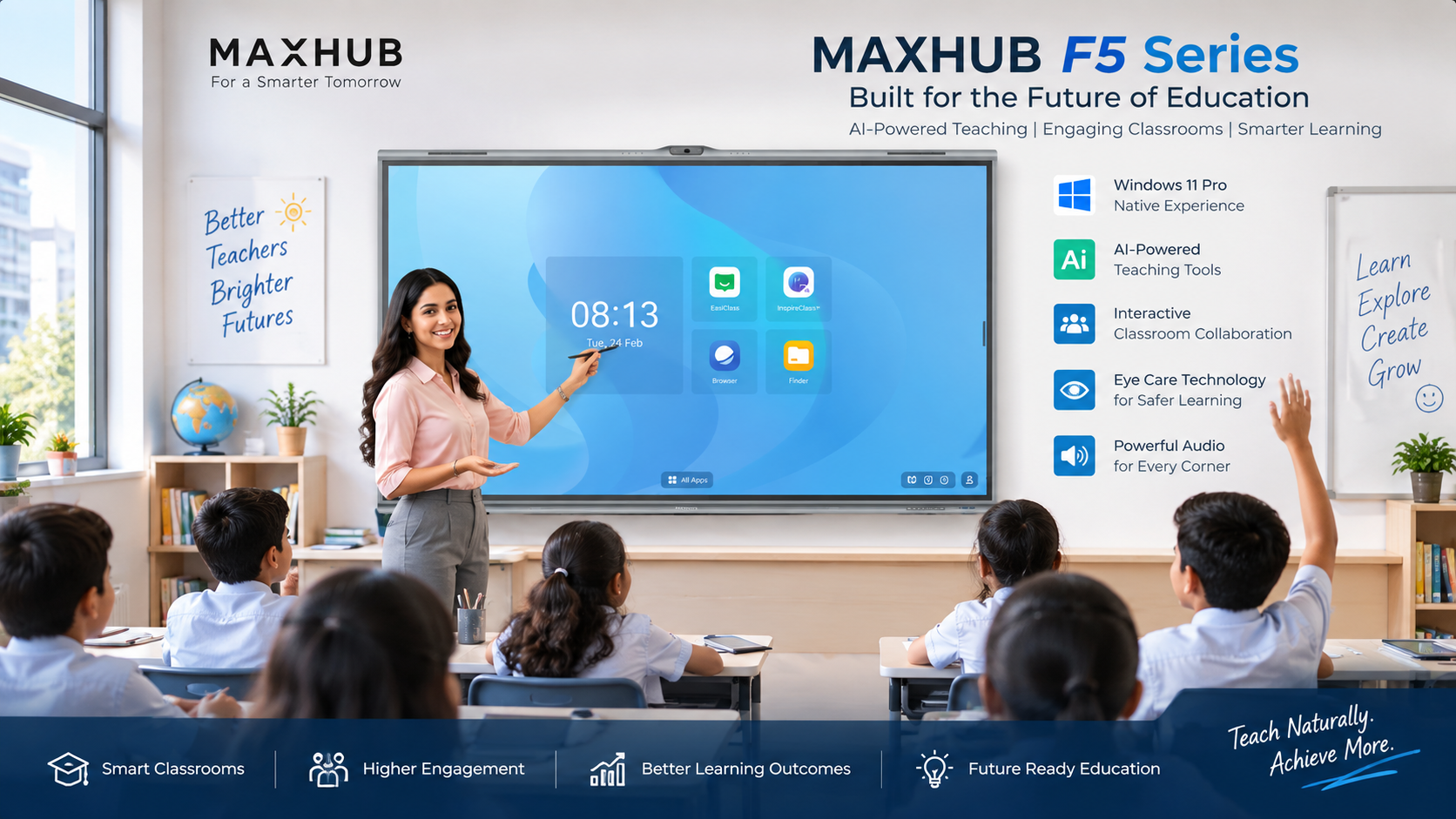
The MAXHUB F5 Series for Education combines a 4K interactive touchscreen, Windows 11 Pro, AI-powered teaching tools, classroom cameras, advanced audio, microphones and eye-comfort technologies in one education-focused display solution. Available in 75-inch and 86-inch models, the F5 Series is designed for smart classrooms, interactive teaching, digital whiteboarding, student engagement, quizzes, hybrid learning and classroom collaboration. This guide covers its key features, specifications, use cases and important considerations for educational institutions.
The MAXHUB F5 Series for Education is an education-focused interactive display platform that combines a 4K interactive touchscreen, AI-powered teaching tools, Windows 11 Pro PC-module support, classroom cameras, an 8-microphone array and integrated audio. The series is available in 75-inch F7550 and 86-inch F8650 models and is designed for interactive teaching, digital whiteboarding, classroom engagement, hybrid learning and modern smart-classroom environments.
Modern classrooms require technology that can support more than traditional presentations. Teachers increasingly need to write directly on digital content, display multimedia lessons, conduct interactive activities, connect with remote learners, collect classroom feedback and access digital teaching resources without constantly switching between different devices.
The MAXHUB F5 Series brings these requirements together in an integrated education-focused interactive display platform. It combines touchscreen interaction, AI-powered teaching tools, Windows-based computing, classroom imaging, microphones and advanced audio.
For schools, colleges, universities and educational institutions evaluating an interactive flat panel display, the right solution should be assessed on more than screen size and resolution. Touch capability, operating system, computing performance, audio, cameras, connectivity, teaching software, installation, device management and long-term support should all be considered.
The MAXHUB F5 Series is an interactive display series designed for modern education environments. It combines a large interactive touchscreen with AI-powered classroom tools and integrated audiovisual technologies.
The supplied MAXHUB product information describes the F5 Series as combining Windows-native familiarity, AI-powered teaching and immersive audiovisual experiences to support teachers and encourage more active student engagement.
A major feature of the F5 Series is its AI-oriented teaching environment through EasiClass. The objective is to make technology useful across different stages of classroom teaching, from lesson preparation to classroom interaction and feedback.
The AI Whiteboard can intelligently recognize handwritten notes and convert them into subject-specific tools. This allows teachers to move naturally between handwriting, diagrams and digital teaching content.
AI Teaching Inspiration is designed to help generate lesson content, classroom activities and teaching ideas, giving teachers additional support when preparing interactive lessons.
Teachers can create classroom games using AI and customizable templates. This can help introduce more interactive activities into lessons.
The Multi-Subject Teaching Toolkit provides subject-specific teaching tools for different classroom scenarios, making the interactive display useful across different subjects.
Teachers can turn lessons into classroom exercises and use interactive quizzes to encourage participation and obtain real-time classroom responses.
The MAXHUB F5 Series can be configured with the MT82S PC Module running Windows 11 Pro. The supplied specifications list a 13th Generation Intel Core i5 processor, Intel UHD Graphics, 8GB RAM expandable up to 32GB and 256GB storage expandable up to 1TB.
This Windows-native approach can be useful for institutions where teachers already depend on Windows applications and familiar desktop workflows.
Buyer Note: Confirm the exact PC module, RAM, storage, Windows configuration, software licensing and application compatibility included in the final quotation.
Both MAXHUB F5 models use a 4K UHD display with a resolution of 3840 × 2160 and a 16:9 aspect ratio.
The F7550 provides a 75-inch display, while the F8650 provides an 86-inch display. Both models specify a 178° horizontal and vertical viewing angle, a wide-viewing-angle panel and 400 nits typical brightness with 450 nits maximum brightness.
The display specification also includes 3mm 9H tempered glass, zero-parallax construction and an anti-glare surface with 25% haze.
Both F7550 and F8650 use infrared touch recognition with 50-point touch and a listed accuracy of ±1.5mm.
MAXHUB Think&Ink features include direct annotation, multi-level object recognition and single-pen dual-color functionality.
| Feature | MAXHUB F7550 | MAXHUB F8650 |
|---|---|---|
| Display Size | 75 inches | 86 inches |
| Resolution | 3840 × 2160 | 3840 × 2160 |
| Aspect Ratio | 16:9 | 16:9 |
| Viewing Angle | 178° H/V | 178° H/V |
| Brightness | 400 nits typical / 450 nits maximum | 400 nits typical / 450 nits maximum |
| Touch | 50-point infrared touch | 50-point infrared touch |
| Built-in Operating System | Android 15.0 | Android 15.0 |
| PC Module | Windows 11 Pro | Windows 11 Pro |
| PC Module CPU | 13th Gen Intel Core i5 | 13th Gen Intel Core i5 |
| Camera System | 5-camera configuration | 5-camera configuration |
| Microphone | 8-mic array | 8-mic array |
| Audio | 2.2-channel SkyWave Sound System | 2.2-channel SkyWave Sound System |
The primary difference between the two models is display size. The 75-inch F7550 may be suitable for classrooms where a 75-inch screen provides sufficient viewing area, while the 86-inch F8650 can be considered where a larger visual canvas is required. The final choice should be based on classroom dimensions, seating arrangement and viewing distance rather than screen size alone.
Students may spend several hours viewing classroom displays, making viewing comfort an important consideration.
The F5 Series uses wide-angle optical technology designed to improve visibility from different classroom seating positions.
The anti-glare surface is designed to minimize reflections and improve visibility in bright classroom environments.
DC dimming technology is designed to provide stable brightness and support more comfortable viewing during extended use.
Low Blue Light technology is designed to reduce blue-light emissions during extended viewing.
The supplied brochure presents these technologies as part of the F5 Series eye-comfort design for long classroom sessions.
Audio is an important part of classroom technology. Teachers need their voice to remain clear across the classroom, while students need to hear multimedia content and remote participants effectively.
The F5 Series uses a 2.2-channel audio system. The supplied MAXHUB information specifies a 74W 2.2-channel speaker system with AI-based voice enhancement intended to improve speech clarity.
The SkyWave Sound System uses a front-facing speaker design and specifies an 88dB Sound Pressure Level at 1m. MAXHUB also states that the system can provide up to 4× longer sound transmission distance compared with traditional speaker designs.
This manufacturer-stated comparison should be considered in the context of the actual classroom environment, room acoustics, speaker positioning and installation conditions.
The F5 Series includes an 8-microphone array with a 180° pickup angle and a specified pickup range of 0–12m.
Audio processing features include:
These features are relevant for classrooms that support remote teaching, hybrid learning or video conferencing.
The MAXHUB F5 Series incorporates a multi-camera classroom imaging system designed to capture classroom activities from different perspectives.
The supplied specification lists a five-camera configuration consisting of:
The listed classroom functions include person counting, random election and gesture recognition.
The multi-focal imaging system is designed to capture classroom views from front to back and includes 5× optical zoom.
On-device, anonymized AI analysis can support functions such as random student selection and participant counting. These capabilities can help teachers organize classroom activities and encourage broader participation.
Interactive response features allow students to answer through gestures and participate in polls, helping teachers capture classroom feedback during lessons.
When an institution deploys interactive displays across multiple classrooms, managing each device individually can become difficult for IT teams.
MAXHUB PIVOT+ is designed to provide centralized management for classroom devices and content.
Centralized dashboards, device management and application control can help IT teams manage classroom devices more efficiently.
Teaching materials and announcements can be managed centrally and distributed to classrooms or buildings.
Classroom devices can be managed remotely from a centralized platform, including device control, updates, incident management and system monitoring.
| Specification | F7550 | F8650 |
|---|---|---|
| Display Size | 75 inches | 86 inches |
| Resolution | 3840 × 2160 | 3840 × 2160 |
| Viewing Angle | 178° H/V | 178° H/V |
| Panel Brightness | 400 nits typical / 450 nits maximum | 400 nits typical / 450 nits maximum |
| Contrast Ratio | 5,500:1 typical / 50,000:1 dynamic | 5,500:1 typical / 50,000:1 dynamic |
| Color Gamut | 98% sRGB | 98% sRGB |
| Color Accuracy | ΔE≤1 | ΔE≤1 |
| Touch Technology | Infrared recognition | Infrared recognition |
| Touch Points | 50 points | 50 points |
| Touch Accuracy | ±1.5mm | ±1.5mm |
| Built-in OS | Android 15.0 | Android 15.0 |
| PC Module OS | Windows 11 Pro | Windows 11 Pro |
| PC Module CPU | 13th Gen Intel Core i5 | 13th Gen Intel Core i5 |
| PC Module RAM | 8GB, up to 32GB | 8GB, up to 32GB |
| PC Module Storage | 256GB, up to 1TB | 256GB, up to 1TB |
| Wi-Fi | Wi-Fi 6 supported | Wi-Fi 6 supported |
| Bluetooth | 5.2 | 5.2 |
| Camera | 5-camera configuration | 5-camera configuration |
| Audio | 2.2-channel SkyWave Sound System | 2.2-channel SkyWave Sound System |
| Sound Pressure Level | 88dB at 1m | 88dB at 1m |
| Microphone | 8-mic array | 8-mic array |
| Microphone Pickup Range | 0–12m | 0–12m |
| Microphone Pickup Angle | 180° | 180° |
| Power Supply | AC 100–240V, 50/60Hz | AC 100–240V, 50/60Hz |
| Standby Power | ≤0.5W | ≤0.5W |
Start by evaluating classroom dimensions, seating arrangement and viewing distance. A larger display is not automatically the best choice for every room.
Consider whether the display will primarily be used for digital whiteboarding, presentations, multimedia teaching, interactive quizzes, AI-assisted teaching or hybrid learning.
Review Wi-Fi coverage, LAN connectivity, electrical points, cabling requirements and existing classroom technology before installation.
If remote or hybrid learning is important, evaluate the integrated camera, microphone and audio capabilities as part of the complete classroom solution.
For institutions deploying displays across multiple classrooms, centralized device management and content distribution can become important considerations.
Before comparing quotations, verify the display model, PC module, RAM, storage, mounting solution, accessories, installation, software, cabling, configuration and support.
A successful smart-classroom installation requires more than mounting the display on a wall.
The supplied product material does not specify a selling price. The final cost of a MAXHUB F5 classroom deployment depends on the selected model, PC-module configuration, accessories, mounting, installation, cabling, software requirements and site conditions.
The final cost depends on the selected configuration, brand, specifications, installation requirements and site conditions.
Educational institutions should evaluate the complete Total Cost of Ownership rather than comparing only the initial display price. Warranty, installation, support, maintenance, device management and future expansion should also be considered.
The F5 Series includes features intended to support everyday classroom use.
The 50,000-hour figure is based on MAXHUB laboratory testing under controlled conditions and should not be treated as a guaranteed real-world operating lifespan.
The F5 Series can support digital whiteboarding, multimedia teaching, interactive quizzes, classroom games and AI-assisted teaching activities.
The 75-inch and 86-inch models can be considered for lecture rooms, seminar rooms, teaching laboratories and collaborative learning environments, depending on room requirements.
The combination of interactive touch, AI teaching tools, cameras, microphones and integrated audio makes the F5 Series relevant for technology-enabled classrooms.
The integrated camera and microphone system can support classrooms where remote participants or video conferencing form part of the teaching workflow.
Educational institutions deploying multiple interactive displays can consider centralized device management and content distribution capabilities through MAXHUB PIVOT+.
Fact: The MAXHUB F5 Series provides 75-inch and 86-inch 4K interactive displays with 50-point infrared touch, Windows 11 Pro PC-module support, AI teaching tools, multi-camera imaging, an 8-microphone array and SkyWave audio.
Recommendation: The F5 Series should be considered by educational institutions looking for an integrated smart-classroom platform rather than a display-only solution. Its combination of interactive teaching, AI tools, Windows computing and integrated audiovisual capabilities makes it relevant for modern classrooms.
Limitation: Actual classroom performance depends on room size, seating arrangement, lighting, acoustics, network conditions, software configuration and installation environment.
Selection approach: Choose between the F7550 and F8650 after evaluating classroom dimensions, viewing distance, teaching workflow and deployment requirements. For multi-classroom deployments, also evaluate centralized device-management requirements.
Planning an interactive classroom for a school, college or educational institution? GoLive eTechnologies can help you evaluate the appropriate MAXHUB F5 screen size, computing configuration, connectivity, audiovisual requirements, installation approach and deployment considerations based on your actual classroom environment.
Your email address will not be published. Required fields are marked *

By Inhype • September 12, 2026
A smart classroom is only as effective as the technology supporting it. Interactive panels, smart boards, PTZ cameras, microphones, speakers, PCs and
Read More
By Inhype • September 12, 2026
Higher education is rapidly moving beyond traditional chalkboards and projectors. Today, colleges and universities need technology that supports inter
Read More
By Inhype • September 12, 2026
A smart classroom for CBSE schools is no longer simply a classroom with a digital board. Modern schools are building connected learning environments t
Read More
By Inhype • September 12, 2026
Planning a smart classroom project for 10, 20 or even 50 classrooms requires more than simply purchasing digital boards. Schools, colleges, universiti
Read More
By Inhype • September 12, 2026
A smart classroom can transform the way teachers explain concepts, students interact with lessons, and institutions deliver digital education. From in
Read More




Golive eTechnologies India Private Limited (CIN - U31909UP2021PTC148242) is one of India's leading providers of smart classrooms, interactive boards, video conferencing solutions, and display technologies for the education, healthcare, corporate, and government sectors.





















No comments yet. Be the first to comment!