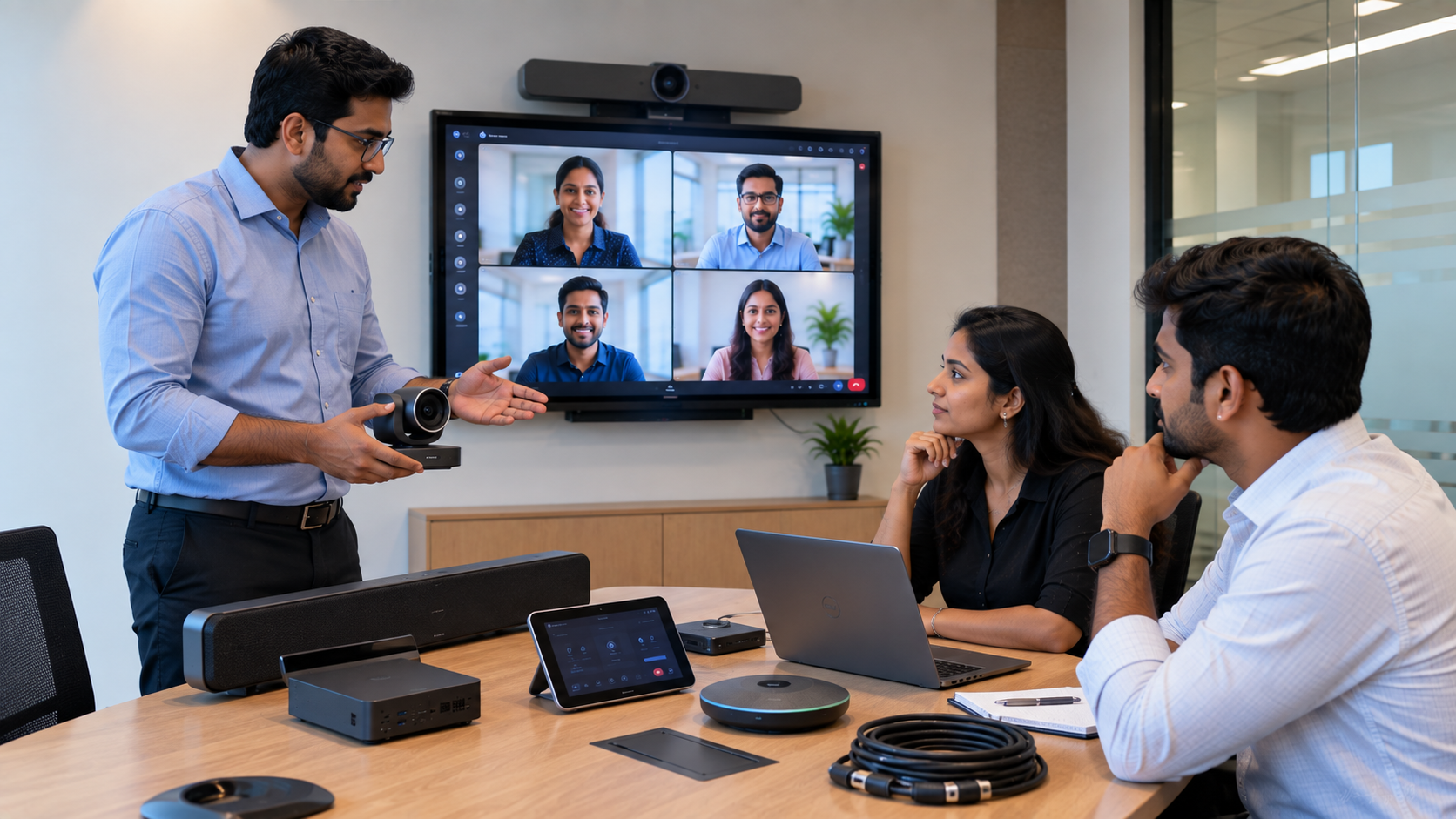
Microsoft Teams Rooms have become an important part of modern meeting infrastructure in India. From corporate boardrooms and hybrid workplaces to training rooms, educational institutions and conference spaces, organisations are looking for reliable solutions that make virtual meetings feel as natural as in-person collaboration. But what is the Microsoft Teams Room cost in India? The answer depends on the room size, display, camera, microphone, speakers, computing hardware, installation requirements and level of support. A professional Teams Room is not simply a camera and screen—it is an integrated meeting-room solution designed to deliver clear video, high-quality audio, easy content sharing and dependable day-to-day operation. With GoLive eTechnologies, customers can build the right meeting-room setup around their requirements, with support from product selection through installation and beyond.
What Is a Microsoft Teams Room?
A Microsoft Teams Room is a dedicated meeting-room setup designed for Microsoft Teams-based video conferencing and hybrid collaboration.
A typical setup can include:
Interactive or professional display
PTZ or conference camera
Microphone and conference speakers
Room PC or compatible computing device
HDMI connectivity and video capture equipment
Wireless or wired presentation solutions
Wall or ceiling mounting accessories
Installation, configuration and user training
For larger rooms, multiple microphones, speakers, PTZ cameras and professional AV equipment may be required.
Microsoft Teams Room Cost in India: What Determines the Price?
There is no single Microsoft Teams Room price because every meeting space has different requirements.
The major cost factors include:
|
Equipment / Service |
Why It Matters |
|---|---|
|
Display |
Determines viewing area and collaboration experience |
|
Camera |
Provides clear video of participants and presenters |
|
Microphone |
Ensures voices are captured clearly |
|
Speakers |
Improve meeting audio and participant engagement |
|
Room PC |
Runs the Teams meeting environment |
|
Capture device |
Helps integrate external HDMI/video sources |
|
Mounting |
Provides secure and professional installation |
|
Installation |
Ensures equipment is configured correctly |
|
Training |
Helps teams use the room confidently |
|
Support |
Reduces downtime and technology-related headaches |
Therefore, instead of searching only for the cheapest conference room setup price, organisations should consider the complete solution and its long-term usability.
Recommended Equipment for a Microsoft Teams Room
1. Interactive Flat Panel Display
An interactive flat panel display can be a valuable addition to meeting and collaboration rooms. It allows teams to display presentations, annotate content, brainstorm ideas and collaborate more visually.
GoLive eTechnologies offers solutions from brands such as Evota, MAXHUB, Newline and LG, depending on the customer's room requirements and budget.
Popular search requirements include:
Evota interactive panel
Evota smart board
Evota 75 inch
Newline interactive panel
Newline digital board
MAXHUB smart board
MAXHUB digital board
LG interactive panel
LG interactive digital board
75 inch interactive display
Rather than choosing a display based only on digital board price in India, consider screen size, resolution, touch functionality, connectivity, operating system, installation and after-sales support.
2. PTZ Camera for Teams Rooms
The camera is one of the most important components of a hybrid meeting room.
A PTZ camera can provide remote control of pan, tilt and zoom, making it suitable for boardrooms, classrooms, training rooms and larger conference spaces.
GoLive eTechnologies solutions can include options such as:
Evota 4K PTZ camera
Evota 10X HD PTZ camera
Evota PTZ camera
Logitech PTZ camera
Logitech PTZ Pro 2
Professional 4K USB cameras
When comparing an Evota 4K PTZ camera price, PTZ camera price or other camera options, look at resolution, optical zoom, field of view, tracking capabilities, connectivity and room size—not just the headline price.
3. Professional Microphones and Speakers
Clear communication requires both good microphones and speakers.
For a conference room, equipment may include:
Conference microphones
Wireless microphones
Wired microphones
Conference speakers
Speakerphone systems
Audio interfaces
Mixer/amplifier systems
GoLive can help customers select an audio setup according to the number of participants, room dimensions and meeting format.
4. Connectivity and Video Capture
Modern meeting rooms often need to connect laptops, displays, cameras and other AV equipment.
A video capture device, HDMI capture solution or compatible switching equipment can help integrate external video sources into the room workflow.
Customers may also require:
HDMI cables
USB extension cables
Video capture cards
HDMI video capture software
USB connectivity accessories
Mounting and installation accessories
The correct combination depends on the Teams Room design and existing infrastructure.
Microsoft Teams Room Equipment: Small vs Large Rooms
Small Meeting Room
A small room may require:
55–65 inch display
USB camera
Compact microphone/speaker
Room PC
Basic connectivity
Professional installation
Medium Meeting Room
A medium room may benefit from:
65–75 inch interactive display
4K PTZ camera
Multiple microphones
Conference speakers
Room PC
HDMI/video capture
Mounting solution
Large Boardroom
A large boardroom may require:
75–86 inch professional display
One or more PTZ cameras
Multiple microphones
Professional speaker system
Audio mixer
Video switching/capture
Advanced cabling
Complete installation and testing
This is why Microsoft Teams Room cost in India should ideally be calculated after understanding the room instead of selecting equipment from a generic price list.
Why Choose GoLive eTechnologies for Teams Room Solutions?
A meeting room is only as useful as its reliability.
GoLive eTechnologies India Private Limited focuses on providing technology solutions with support throughout the implementation journey.
Our approach is simple:
Technology that works, backed by people who help.
From choosing the right Evota smart board, MAXHUB smart board, Newline interactive panel, LG interactive panel or professional PTZ camera to installation and post-deployment assistance, customers can get an end-to-end technology experience.
What You Get with GoLive
Right solution: Equipment selected around your actual room requirements.
Fast deployment: Streamlined coordination from selection to installation.
Professional installation: Equipment is installed and configured properly.
Training: Users receive assistance to operate the technology confidently.
Ongoing support: Help remains available after deployment.
Less technology headache: One partner for the complete solution.
This approach also reflects what customers commonly value in GoLive eTechnologies reviews—service, support, fast delivery, installation, training and assistance.
Teams Room vs Buying Equipment Separately
Buying individual products may sometimes appear cheaper, but it can create compatibility and installation challenges.
|
Individual Equipment Purchase |
Integrated GoLive Solution |
|---|---|
|
Customer manages product selection |
Solution based on room requirements |
|
Compatibility needs to be checked separately |
Components planned together |
|
Installation may be separate |
Installation support available |
|
Training may not be included |
User assistance available |
|
Multiple vendors may be involved |
End-to-end coordination |
|
Troubleshooting can be complicated |
Post-sale support available |
For organisations where meeting-room downtime affects productivity, the additional value of professional implementation can be significant.
How to Get the Right Microsoft Teams Room Setup in India
Before purchasing, consider:
Room size – Small huddle rooms need different equipment from boardrooms.
Participant count – More people require wider camera coverage and better audio.
Display size – Choose a screen that can be comfortably viewed from the back of the room.
Camera requirements – Consider 4K resolution, PTZ capability and optical zoom.
Audio – Select microphones and speakers according to room acoustics.
Connectivity – Check USB, HDMI and network requirements.
Installation – Plan mounting, cabling, power and configuration.
Support – Choose a supplier that can assist after installation.
GoLive eTechnologies: Complete Meeting Room Technology Support
Whether you are setting up a corporate boardroom, training centre, smart classroom, hybrid classroom or professional teaching studio, the right equipment can make collaboration easier and more reliable.
GoLive eTechnologies brings together interactive displays, digital boards, PTZ cameras, audio equipment, connectivity accessories and installation support to help organisations create practical technology environments.
The goal is not simply to sell a screen or camera. It is to deliver the right solution + fast deployment + installation + support, giving customers greater confidence that everything will work.
Final Thoughts
The Microsoft Teams Room cost in India varies according to room size, equipment specifications, installation complexity and support requirements. A professional solution should therefore be evaluated on total value rather than equipment price alone.
From Evota interactive panels and 4K PTZ cameras to MAXHUB, Newline and LG display solutions, GoLive eTechnologies can help you select technology that fits your meeting environment.
Technology that works, backed by people who help.
For a customised Microsoft Teams Room solution, contact GoLive eTechnologies and discuss your room size, participant capacity, equipment requirements and budget with the team.
1. What is the Microsoft Teams Room cost in India?
The cost depends on room size, display, camera, microphones, speakers, computing hardware, connectivity, installation and support. A customised quotation is recommended.
2. Which display is suitable for a Microsoft Teams Room?
Depending on the room, organisations can consider Evota, MAXHUB, Newline or LG interactive displays in suitable screen sizes such as 65, 75 or 86 inches.
3. Can GoLive eTechnologies install a complete Teams Room?
Yes. GoLive eTechnologies provides an end-to-end approach covering solution selection, equipment coordination, installation, configuration, training and support.
4. Does GoLive deliver meeting-room equipment across India?
GoLive eTechnologies serves customers across India. Delivery and installation availability can depend on the location and selected solution, so customers should confirm requirements before ordering.
5. How do I get a price for a Microsoft Teams Room setup?
Share your city, room dimensions, participant capacity, preferred display size and requirements with GoLive eTechnologies for a solution-specific quotation.
Your email address will not be published. Required fields are marked *

By Inhype • September 12, 2026
A smart classroom is only as effective as the technology supporting it. Interactive panels, smart boards, PTZ cameras, microphones, speakers, PCs and
Read More
By Inhype • September 12, 2026
Higher education is rapidly moving beyond traditional chalkboards and projectors. Today, colleges and universities need technology that supports inter
Read More
By Inhype • September 12, 2026
A smart classroom for CBSE schools is no longer simply a classroom with a digital board. Modern schools are building connected learning environments t
Read More
By Inhype • September 12, 2026
Planning a smart classroom project for 10, 20 or even 50 classrooms requires more than simply purchasing digital boards. Schools, colleges, universiti
Read More
By Inhype • September 12, 2026
A smart classroom can transform the way teachers explain concepts, students interact with lessons, and institutions deliver digital education. From in
Read More




Golive eTechnologies India Private Limited (CIN - U31909UP2021PTC148242) is one of India's leading providers of smart classrooms, interactive boards, video conferencing solutions, and display technologies for the education, healthcare, corporate, and government sectors.





















No comments yet. Be the first to comment!