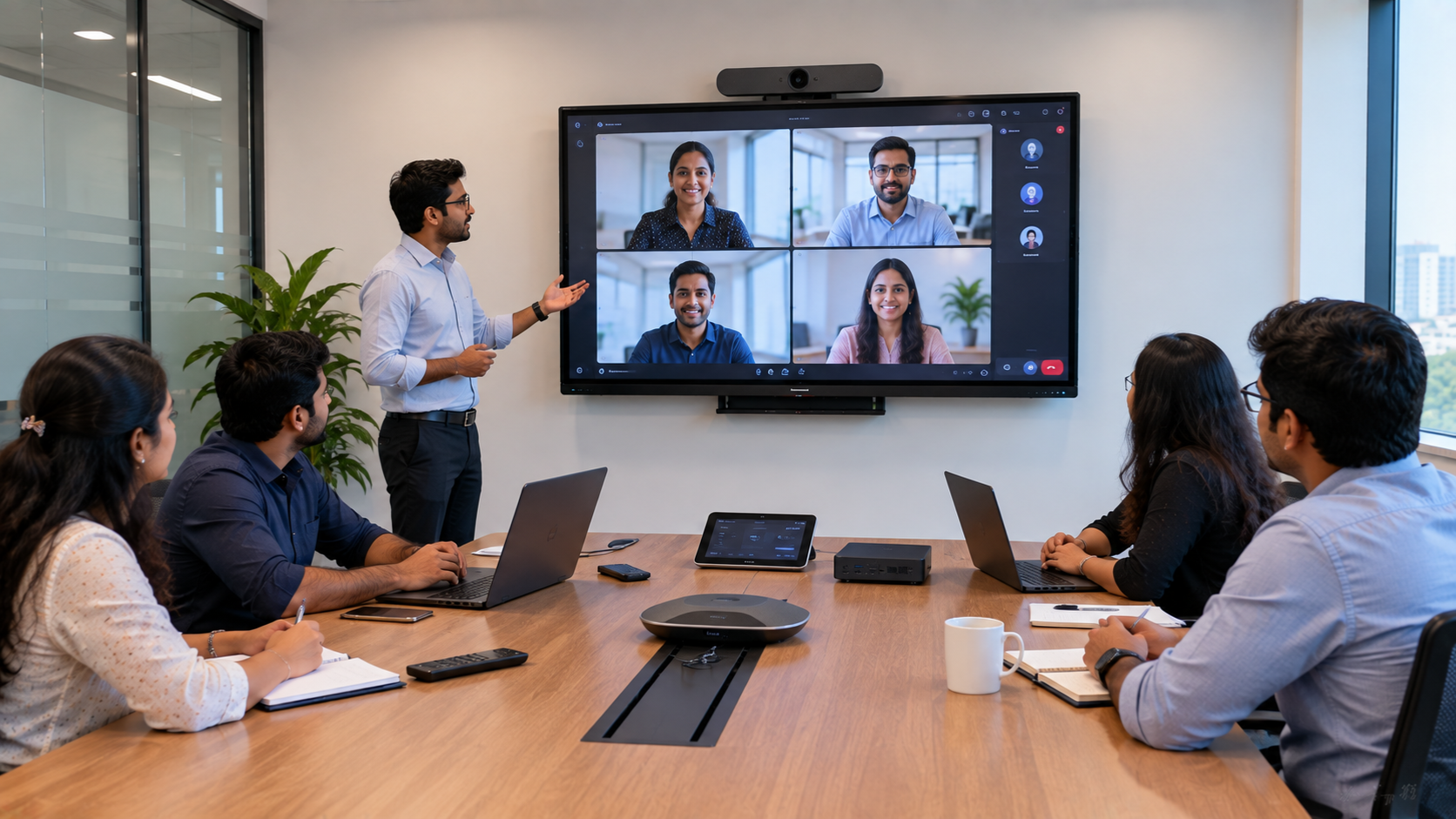
Hybrid meetings have become a standard part of modern business. From corporate offices and boardrooms to training centres, educational institutions and coworking spaces, businesses need meeting-room technology that is easy to use, reliable and scalable. A well-designed Microsoft Teams Room setup combines a display, camera, microphone, speakers, room computer and collaboration technology to create a professional meeting experience. However, choosing individual devices without considering room size, acoustics, connectivity and installation can result in poor audio, camera blind spots and unnecessary technology costs. That is where an experienced technology partner can make a difference. GoLive eTechnologies provides end-to-end technology support—from selecting the right equipment to installation, configuration, training and after-sales assistance—helping Indian businesses build meeting rooms that simply work.
What Is a Microsoft Teams Room?
A Microsoft Teams Room is a dedicated meeting-room environment designed to make Microsoft Teams meetings easier to start and manage.
Instead of connecting a personal laptop to a TV and webcam every time, a professional meeting room can include:
Interactive or large-format display
PTZ or conference camera
Room PC or Teams-compatible computing system
Conference microphone
Conference room speakers
Touch controller
HDMI connectivity and video capture equipment
Wireless presentation and collaboration solutions
The exact configuration depends on the room size, number of participants and type of meetings conducted.
Why Invest in a Microsoft Teams Room Setup in India?
Indian businesses increasingly operate across multiple cities, offices and remote locations. A properly designed conference room can reduce communication barriers and improve collaboration.
Key benefits include:
Better meeting experience: High-quality video and audio make conversations clearer.
Professional presentations: Large interactive displays make documents, presentations and dashboards easier to share.
Hybrid collaboration: Remote participants can participate more naturally in meetings.
Simplified operation: A dedicated room system can reduce the complexity of connecting multiple devices.
Scalability: Meeting rooms can be designed for small huddle spaces as well as large boardrooms.
Reduced technology headaches: Professional selection and installation ensure that components work together.
Microsoft Teams Room Equipment: What Do You Need?
The right equipment depends on the room and business requirements. A typical setup may include the following.
1. Interactive Display or Large Screen
A 75-inch interactive display can be suitable for medium and large meeting rooms where participants need to view presentations, documents and shared content.
Options such as an Evota interactive panel, MAXHUB smart board, Newline interactive panel or compatible LG interactive display can be evaluated based on features, connectivity, room size and budget.
Interactive panels can also support brainstorming, annotation and collaborative presentations.
2. PTZ Conference Camera
A PTZ camera is an important component of a professional meeting room.
An Evota 4K PTZ camera or other suitable PTZ solution can provide improved video quality and flexible framing compared with basic webcams.
Depending on the room, businesses can evaluate:
4K PTZ cameras
10x optical zoom cameras
Conference cameras
Lecture capture cameras
Logitech PTZ solutions
The camera should be positioned to capture all participants while maintaining a natural viewing angle.
3. Conference Microphone and Speakers
Audio quality is often more important than video quality during business meetings.
A complete setup may require:
Conference microphones
Wireless microphones
Ceiling or wall-mounted speakers
Conference speakers with microphones
Professional audio interfaces
Mixer/amplifier systems for larger rooms
For larger boardrooms, audio should be planned according to room dimensions and acoustics rather than simply choosing the loudest speaker.
4. Room PC and Connectivity
The meeting-room computer connects the different components and runs the collaboration environment.
Businesses may also require:
HDMI cables
USB extension cables
HDMI video capture devices
Capture cards
Wireless presentation systems
Network connectivity
Cable-management solutions
Professional installation helps ensure that cameras, displays, microphones and computers communicate correctly.
Best Display Options for Microsoft Teams Rooms
There is no single "best" smart board for every business.
|
Display option |
Best suited for |
|---|---|
|
Evota Interactive Panel |
Corporate meetings, collaboration and training |
|
MAXHUB Smart Board |
Collaboration-heavy meeting rooms |
|
Newline Interactive Panel |
Education, training and corporate collaboration |
|
LG Interactive Display |
Premium business environments |
|
Large-format digital display |
Presentation-focused conference rooms |
GoLive eTechnologies can help businesses compare screen size, resolution, touch capability, connectivity and installation requirements before purchasing.
If you are comparing Evota smart board price, MAXHUB smart board price, Newline interactive panel price in India or LG interactive digital board price in India, the final cost can vary according to screen size, model, accessories, installation and configuration.
Microsoft Teams Room Setup: Small vs Large Meeting Rooms
Small Meeting Room
A small huddle room may require:
55–65 inch display
USB conference camera
Speakerphone
Room PC
HDMI/USB connectivity
Medium Meeting Room
A medium conference room may benefit from:
65–75 inch interactive display
PTZ camera
Dedicated microphone
Conference speakers
Room computer
Wireless presentation system
Large Boardroom
A large boardroom may require:
75–86 inch interactive display or multiple displays
4K PTZ camera
Optical zoom
Multiple microphones
Professional speaker system
Audio mixer
Video capture equipment
Advanced cable management
The goal should always be right-sized technology, rather than simply buying the most expensive equipment.
Microsoft Teams Room Setup Cost in India
The cost of a Microsoft Teams Room depends heavily on the configuration.
Factors affecting the overall investment include:
Display size and brand
Interactive-panel features
Camera resolution and zoom
Number of microphones
Speaker configuration
Room PC
Mounting hardware
Cabling
Installation
Software/licensing requirements
Training and support
For this reason, businesses searching for digital board price in India, 75 inch interactive display price, PTZ camera price, or smart board price in India should compare the complete installed solution, not just the individual product price.
A low-cost device may not necessarily provide the lowest total cost if additional accessories, installation or troubleshooting are required later.
Why Choose GoLive eTechnologies for Meeting Room Solutions?
The technology is only one part of a successful meeting-room project.
GoLive eTechnologies follows an end-to-end approach:
1. Requirement Assessment
Understand the room, participants, meeting format and existing infrastructure.
2. Product Selection
Recommend displays, cameras, microphones and accessories based on actual requirements.
3. Installation
Professionally install and configure the equipment.
4. Testing
Check audio, video, connectivity, display performance and room usability.
5. Training
Help users understand how to operate the system.
6. Ongoing Support
Provide assistance when businesses need help after deployment.
This reflects the GoLive brand promise:
Technology that works, backed by people who help.
The objective is simple: less technology headache and more confidence that everything will work.
GoLive eTechnologies: Your Technology Partner in India
Whether you are setting up a corporate boardroom in Delhi NCR, a training room in Noida, a conference room in Gurgaon, or a collaborative classroom anywhere in India, GoLive eTechnologies can help you plan the complete technology environment.
GoLive solutions can include:
Interactive flat panels
Smart boards
PTZ cameras
Conference cameras
Audio and microphone systems
Video capture devices
Digital classroom equipment
Online teaching setups
Hybrid classroom solutions
Meeting-room accessories
Installation and support
From an Evota digital board to a MAXHUB digital board, Newline interactive panel or LG interactive panel, the right solution depends on your application—not simply the brand name.
Final Checklist for a Microsoft Teams Room
Before purchasing, consider:
What is the room size?
How many people normally attend meetings?
Is an interactive display required?
Do you need PTZ camera functionality?
How many microphones are needed?
Where should speakers be positioned?
Is wireless presentation required?
Is the existing network suitable?
Who will install and configure the system?
What after-sales support is available?
A properly planned room delivers better performance, easier operation and a more predictable technology investment.
Build a Smarter Meeting Room with GoLive eTechnologies
A successful Microsoft Teams Room is more than a screen and camera. It is an integrated ecosystem where display, camera, audio, computing, connectivity, installation and support work together.
With GoLive eTechnologies, businesses can get the right solution + fast deployment + installation + support, backed by people who can help beyond the purchase.
Looking for a Microsoft Teams Room setup in India or Delhi NCR? Contact GoLive eTechnologies for a requirement-based solution and get the right meeting-room technology for your space.
Your email address will not be published. Required fields are marked *

By Inhype • September 12, 2026
A smart classroom is only as effective as the technology supporting it. Interactive panels, smart boards, PTZ cameras, microphones, speakers, PCs and
Read More
By Inhype • September 12, 2026
Higher education is rapidly moving beyond traditional chalkboards and projectors. Today, colleges and universities need technology that supports inter
Read More
By Inhype • September 12, 2026
A smart classroom for CBSE schools is no longer simply a classroom with a digital board. Modern schools are building connected learning environments t
Read More
By Inhype • September 12, 2026
Planning a smart classroom project for 10, 20 or even 50 classrooms requires more than simply purchasing digital boards. Schools, colleges, universiti
Read More
By Inhype • September 12, 2026
A smart classroom can transform the way teachers explain concepts, students interact with lessons, and institutions deliver digital education. From in
Read More




Golive eTechnologies India Private Limited (CIN - U31909UP2021PTC148242) is one of India's leading providers of smart classrooms, interactive boards, video conferencing solutions, and display technologies for the education, healthcare, corporate, and government sectors.





















No comments yet. Be the first to comment!