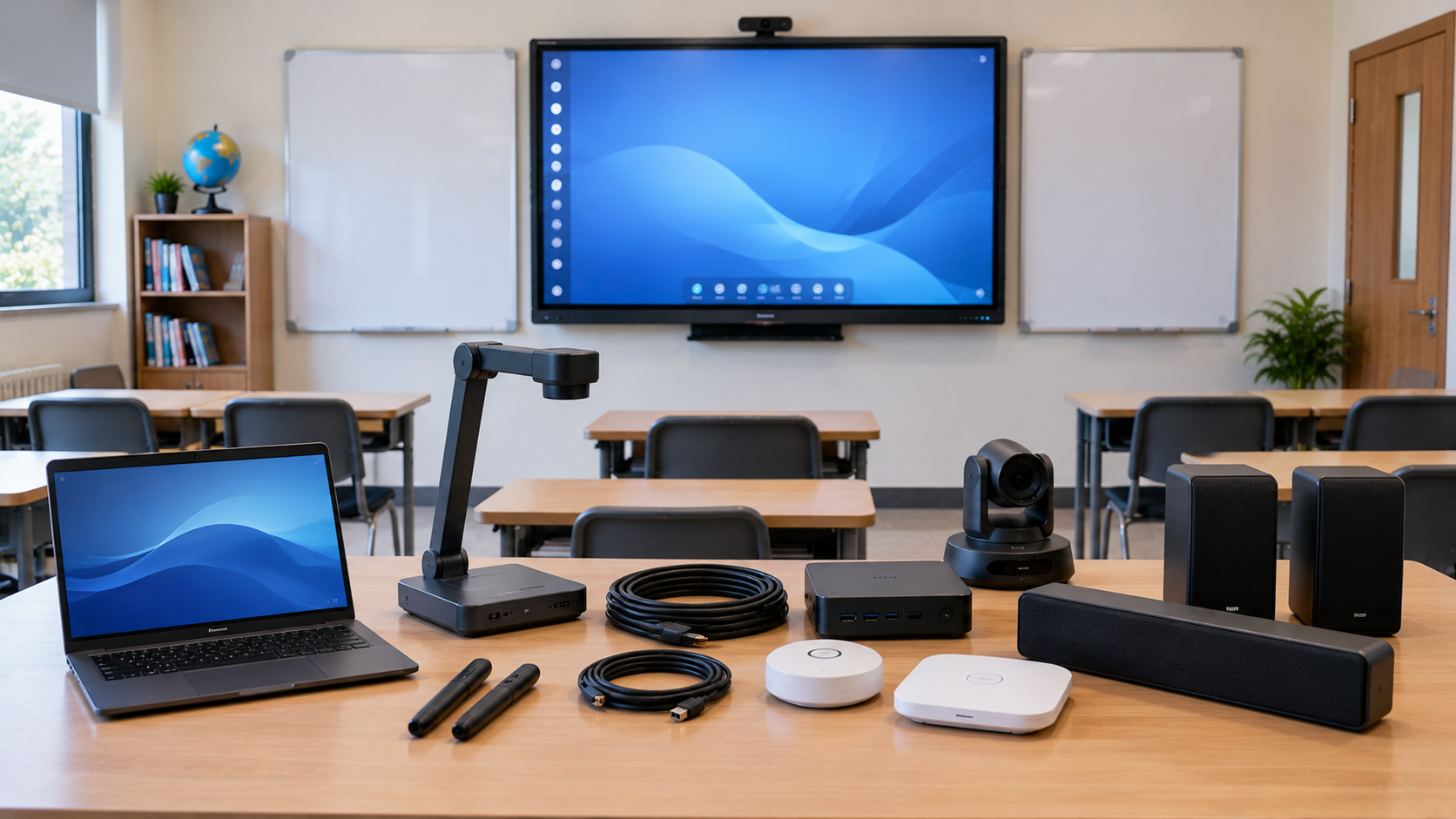
A smart classroom is more than a digital board mounted on a wall. A well-designed classroom combines an interactive display, computing, audio, camera, connectivity and the right accessories into one reliable teaching environment. Whether you are setting up a school classroom, coaching centre, university lecture room, training room or hybrid teaching studio, the challenge is knowing which smart classroom equipment you actually need—and which products you can skip. At GoLive eTechnologies India Private Limited, the focus is not simply on selling individual devices. The goal is to create an integrated solution that works together, from product selection and installation to training and after-sales support.
Smart Classroom Equipment List: The Essential Components
A practical smart classroom setup generally includes six core equipment categories:
Interactive flat panel or digital board
OPS PC or teaching computer
PTZ camera or classroom camera
Microphone and audio system
Connectivity and capture equipment
Mounting, power and installation accessories
The right combination depends on classroom size, teaching method, online-learning requirements and budget.
1. Interactive Flat Panel or Digital Board
The interactive display is the centre of a modern digital smart classroom.
Instead of a traditional blackboard or projector, an interactive flat panel allows teachers to write, annotate, present videos, access digital content and interact with learning applications.
Popular options available through GoLive include:
Evota Smart Board / Evota Interactive Panel
LG Interactive Digital Board
MAXHUB Smart Board
Newline Interactive Panel
Samsung and BenQ interactive displays
Screen sizes such as 65, 75, 86 and larger are suitable for different classroom layouts.
Which size should you choose?
|
Classroom |
Recommended Display |
|---|---|
|
Small classroom |
65 inch |
|
Standard classroom |
75 inch |
|
Large classroom |
86 inch |
|
Auditorium / large training room |
86 inch or larger |
For example, the GoLive website currently lists the Evota EP75 75-inch 4K UHD display at ₹92,700 and the Evota EP86 86-inch model at ₹1,72,000, while other brands and configurations are available at different price points.
This is why searches such as Evota smart board 75 inch price, LG interactive digital board price India, Newline digital board price and MAXHUB smart board price in India should be evaluated according to specifications—not price alone.
What to check before buying
Look for:
4K resolution
Multi-touch support
Android/EDLA capabilities where required
Adequate RAM and storage
HDMI and USB connectivity
Screen-sharing capability
OPS PC compatibility
Warranty and service support
2. OPS PC or Teaching Computer
An interactive panel can perform many functions independently, but an OPS PC can provide a more complete Windows-based teaching environment.
It is useful for:
PowerPoint presentations
Microsoft Office
Web-based teaching platforms
Educational software
Screen recording
Video playback
Online classes
Content creation
GoLive currently lists an Intel Core i5 12th Gen OPS PC with 8GB RAM and 256GB SSD at ₹27,000.
For institutions, choosing an OPS module that is compatible with the selected interactive panel can make the classroom easier to operate and maintain.
3. PTZ Camera for Online and Hybrid Classes
If your classroom needs online teaching, lecture recording or hybrid learning, a camera becomes essential.
A PTZ camera can provide pan, tilt and zoom functionality, making it easier to capture the teacher, board and classroom without constantly repositioning a camera.
GoLive offers options such as:
Evota 4K PTZ Camera
Evota C12HULT 4K PTZ Camera
Evota 10x HD PTZ Camera
MAXHUB PTZ cameras
Logitech PTZ solutions
The GoLive website currently lists the Evota C12HULT 4K PTZ Camera with 12X optical zoom at ₹51,000 and the MAXHUB UC P25 4K PTZ Camera at ₹58,200.
A PTZ camera is particularly useful for:
Online classes
Hybrid classrooms
Lecture recording
Coaching centres
Training rooms
Webinars
Live streaming
4. Microphone and Audio System
A smart classroom with poor audio is still a poor learning experience.
Teachers should be clearly audible from every seat, while remote students should receive clean and understandable sound.
Depending on the classroom, you may need:
Wireless microphone
Headset or collar microphone
USB microphone
Amplifier
Wall or ceiling speakers
Conference speaker and microphone
GoLive offers microphone and speaker categories designed for education, corporate and presentation environments. Its current product range includes wireless microphones and professional audio options.
For a basic classroom, a teacher microphone paired with suitable speakers may be enough. Larger rooms may require a more carefully designed audio system.
5. Writing Pad for PC and Digital Annotation Accessories
Not every teaching setup requires an additional writing pad, but a writing pad for PC, USB writing pad or computer writing pad can be useful when teachers prefer handwriting input while using a computer.
A writing tablet can be useful for:
Mathematics
Science diagrams
Digital handwriting
Online tutoring
Remote teaching
Screen annotation
Demonstrations
For online educators, a pen tablet for online teaching can sometimes provide a more comfortable writing experience than using a mouse.
The important point is compatibility: the writing pad should work smoothly with the computer, teaching software and display workflow.
6. Connectivity, Capture and Accessories
The final category is often overlooked.
A complete smart classroom equipment list may also include:
HDMI cables
USB extension cables
HDMI video capture device
Video capture card
Network connectivity
Wall mount or mobile stand
Power protection
Cable management
Digital board pen/stylus
OPS accessories
A capture device becomes especially useful when the classroom is being converted into an online class studio setup or lecture-recording environment.
For institutions conducting hybrid classes, the complete workflow should be tested from camera → computer → display → audio → online platform before deployment.
Smart Classroom Equipment: What Is Essential vs Optional?
|
Equipment |
Need Level |
Best For |
|---|---|---|
|
Interactive Panel |
Essential |
Digital teaching |
|
OPS PC |
Recommended |
Windows-based teaching |
|
PTZ Camera |
Essential for hybrid classes |
Online teaching |
|
Teacher Microphone |
Recommended |
Clear classroom audio |
|
Speakers |
Essential |
Medium/large rooms |
|
Writing Pad |
Optional |
Digital handwriting |
|
Capture Card |
Optional |
Recording/streaming |
|
Stand/Mount |
Essential |
Safe installation |
|
Lighting |
Optional |
Recorded/online classes |
The goal is not to purchase every available device. The goal is to select the right solution for the classroom.
How Much Does a Smart Classroom Setup Cost in India?
There is no single smart classroom equipment price because the cost depends on screen size, brand, camera, audio, computing and installation requirements.
For reference, current GoLive listings include products such as:
Evota EP75 75-inch interactive display – ₹92,700
Evota EP65 65-inch interactive display – ₹95,000
Evota EP86 86-inch interactive display – ₹1,72,000
Evota C12HULT PTZ camera – ₹51,000
Intel Core i5 OPS PC – ₹27,000
Studio lighting for digital boards – ₹11,500
These are examples rather than a fixed package price, and GoLive notes that prices, offers and availability can change.
This also explains why searches for digital board price under 5000 can be misleading when the requirement is a full-size interactive classroom display. A complete 65–86 inch interactive solution involves significantly more hardware and functionality than a basic writing board.
How to Choose the Right Smart Classroom Setup
Before placing an order, answer five questions:
1. How large is the classroom?
Choose the display size according to viewing distance and seating capacity.
2. Do you need online teaching?
If yes, add a PTZ camera and appropriate microphone/audio system.
3. Does the teacher use Windows software?
If yes, consider an OPS PC.
4. Do teachers need handwriting or annotation?
Consider the panel's built-in touch capabilities or a writing pad for PC.
5. Who will install and support the system?
This is often more important than choosing the lowest product price.
A classroom technology system should be evaluated as an ecosystem rather than as separate products. GoLive's approach is based on integrating interactive displays, cameras, computing, writing solutions and audio into a practical deployment.
Why Choose GoLive eTechnologies for Smart Classrooms?
Technology that works, backed by people who help.
GoLive eTechnologies provides end-to-end technology support—from selection and configuration to installation and beyond.
The benefit is simple: less technology headache and more confidence that everything will work.
GoLive supports education, corporate, government and training environments with interactive panels, cameras, microphones, computing solutions and related AV equipment.
The GoLive proposition is built around:
Right solution for your room and teaching requirements
Fast deployment for institutions
Professional installation
Training and assistance
After-sales support
India-wide delivery and deployment
Delhi NCR expertise
Customer feedback also commonly highlights the value of service, support, fast delivery, installation, training and assistance—turning the buying process into a more confident technology experience.
Whether you are searching for an Evota digital board, MAXHUB digital board, LG interactive panel, Newline interactive panel, PTZ camera for teaching online, or a complete smart classroom setup, the right solution should be selected around your actual teaching environment.
Final Checklist: Smart Classroom Equipment List
Before deployment, make sure your classroom has:
Interactive flat panel/digital board
OPS PC or compatible computer
PTZ camera if online/hybrid teaching is required
Teacher microphone
Suitable speakers
HDMI/USB connectivity
Writing/annotation solution
Mounting or stand
Network and power infrastructure
Installation, testing and teacher training
Build Your Smart Classroom with GoLive
Don't buy technology piece by piece and hope it works together. Choose an integrated smart classroom solution designed around your classroom, students and teaching workflow.
Explore smart classroom equipment, interactive panels, PTZ cameras and complete education solutions from GoLive eTechnologies—and get the right solution, fast deployment, installation and support from selection to beyond.
Your email address will not be published. Required fields are marked *

By Inhype • September 12, 2026
A smart classroom is only as effective as the technology supporting it. Interactive panels, smart boards, PTZ cameras, microphones, speakers, PCs and
Read More
By Inhype • September 12, 2026
Higher education is rapidly moving beyond traditional chalkboards and projectors. Today, colleges and universities need technology that supports inter
Read More
By Inhype • September 12, 2026
A smart classroom for CBSE schools is no longer simply a classroom with a digital board. Modern schools are building connected learning environments t
Read More
By Inhype • September 12, 2026
Planning a smart classroom project for 10, 20 or even 50 classrooms requires more than simply purchasing digital boards. Schools, colleges, universiti
Read More
By Inhype • September 12, 2026
A smart classroom can transform the way teachers explain concepts, students interact with lessons, and institutions deliver digital education. From in
Read More




Golive eTechnologies India Private Limited (CIN - U31909UP2021PTC148242) is one of India's leading providers of smart classrooms, interactive boards, video conferencing solutions, and display technologies for the education, healthcare, corporate, and government sectors.





















No comments yet. Be the first to comment!