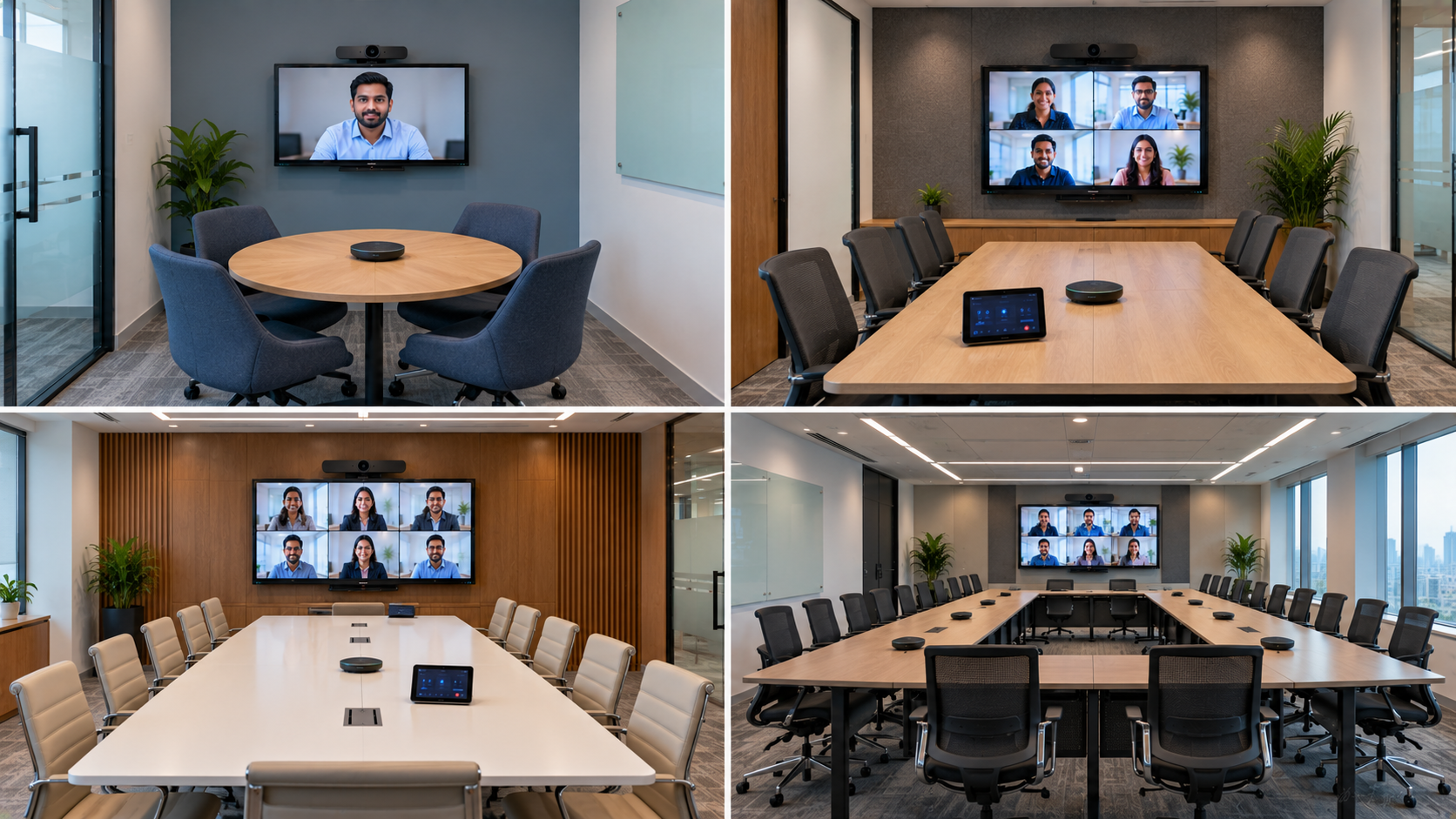
A successful video conferencing room is not simply about buying a camera and display. The right setup depends on room size, seating capacity, viewing distance, lighting, acoustics, camera coverage and collaboration requirements. Whether you are setting up a small meeting room, corporate boardroom, hybrid classroom or professional conference room, choosing the right equipment can significantly improve communication and productivity. For businesses across India, GoLive eTechnologies provides end-to-end technology solutions—from product selection and installation to configuration, training and ongoing support. The goal is simple: the right solution, fast deployment and less technology headache.
What Is a Video Conferencing Room?
A video conferencing room is a dedicated space equipped with technology that enables people in different locations to communicate through high-quality video and audio.
A typical conference room setup may include:
Interactive or professional display
PTZ camera or conference camera
Conference microphone and speaker
Video conferencing computer or PC
HDMI video capture device or capture card
Network connectivity
Mounting and installation accessories
Optional wireless presentation and collaboration equipment
The equipment you need changes considerably depending on the size and purpose of the room.
Video Conferencing Room Size Guide
|
Room Type |
Approx. Capacity |
Recommended Equipment |
|---|---|---|
|
Small Huddle Room |
2–6 people |
4K USB camera, display, speakerphone |
|
Medium Meeting Room |
6–12 people |
PTZ camera, interactive panel, conference microphone |
|
Large Conference Room |
12–20 people |
PTZ camera, large interactive display, microphones + speakers |
|
Boardroom |
15–30+ people |
Multiple audio zones, PTZ cameras, large display/LED |
|
Training/Hybrid Room |
20–50+ people |
Interactive panel, PTZ camera, microphones, speakers, capture system |
These are practical guidelines rather than fixed rules. Room dimensions, seating arrangement and camera field of view should always be considered before selecting equipment.
1. Small Video Conferencing Room: 2–6 People
Small huddle rooms generally require a compact and easy-to-use setup.
Recommended equipment
Camera: A 4K USB camera or compact conference camera
Display: 55–65-inch display or interactive panel
Audio: Integrated speaker or compact conference speakerphone
Connectivity: USB/HDMI connectivity and reliable internet
An Evota 4K camera can be considered where high-resolution video is important, while compact Logitech conferencing solutions can work well for smaller meeting spaces.
For teams that need digital collaboration in addition to meetings, an Evota interactive panel can combine presentation, annotation and video conferencing capabilities in one display.
Best for
Small team meetings
Huddle rooms
Interview rooms
Remote consultations
Start-up meeting spaces
2. Medium Conference Room: 6–12 People
Medium-sized rooms require better camera coverage and more capable audio equipment.
A practical configuration can include:
65–75-inch interactive display
4K PTZ camera
Conference microphone
Conference speaker
Mini PC or dedicated conferencing PC
HDMI connectivity
Wireless presentation solution
An Evota 4K PTZ camera is particularly suitable when participants are positioned at different distances from the camera. PTZ cameras provide pan, tilt and zoom functionality, making them more flexible than a fixed webcam.
For display requirements, businesses can compare an Evota interactive flat panel, MAXHUB smart board, Newline interactive panel or LG interactive panel according to room requirements and budget.
Instead of choosing equipment solely based on online searches such as newline smart board price, LG interactive digital board price India or MAXHUB smart board price in India, consider the complete solution cost—including installation, configuration and support.
3. Large Conference Room: 12–20 People
Large conference rooms need wider camera coverage and stronger audio distribution.
Recommended setup
Display: 75–86-inch interactive panel or professional display
Camera: 4K PTZ camera with optical zoom
Audio: Conference microphone + dedicated speakers
Computer: High-performance conferencing PC
Connectivity: HDMI, USB and network infrastructure
An Evota 10X HD PTZ camera or Evota 4K PTZ camera can be considered for larger rooms where camera positioning and zoom are important.
A 75-inch Evota smart board or interactive flat panel can provide enough screen real estate for presentations, remote participants and collaborative content.
For larger installations, brands such as MAXHUB, Newline and LG can also be evaluated based on display size, features, software compatibility and budget.
4. Boardroom Video Conferencing Setup
A professional boardroom requires more than a large screen.
For a premium boardroom, consider:
75–100-inch professional display or LED
PTZ camera with optical zoom
Multiple microphones
Conference room speakers
Echo cancellation
Dedicated conferencing PC
HDMI video capture device
Cable management
Professional installation
A PTZ camera for live streaming or conferencing is useful when participants need to remain visible from different seating positions.
For high-end boardrooms, multiple cameras can also be integrated to provide different views of the room.
5. Hybrid Classroom and Training Room Setup
Video conferencing technology is increasingly being used in smart classrooms, coaching centres, training rooms and hybrid classrooms.
A hybrid classroom setup may include:
75–86-inch interactive flat panel
4K PTZ camera
Teacher microphone
Conference speakers
Teaching PC/laptop
HDMI capture device
Wireless presentation
Recording or lecture capture system
An Evota interactive flat panel can support teaching, annotation, presentations and online collaboration from one screen.
This makes it useful for schools, universities, coaching centres and corporate training facilities looking for a digital classroom setup.
Which Display Size Should You Choose?
The correct display size depends on viewing distance and room layout.
65-inch interactive display
Suitable for:
Small classrooms
Huddle rooms
Small meeting rooms
Small training spaces
75-inch interactive display
A popular choice for:
Medium conference rooms
Classrooms
Training rooms
Boardrooms
Businesses searching for terms such as Evota smart board 75 inch price, Newline digital board 75 inch price, LG interactive panel 75 inch price or MAXHUB digital board price should compare specifications and complete installation requirements rather than price alone.
86-inch and larger displays
Best suited for:
Large classrooms
Boardrooms
Training centres
Large conference rooms
Hybrid learning environments
PTZ Camera vs Webcam: Which Is Better?
A standard webcam can be sufficient for small rooms, but a PTZ camera becomes more useful as the room gets larger.
|
Feature |
Webcam |
PTZ Camera |
|---|---|---|
|
Small rooms |
Excellent |
Good |
|
Large rooms |
Limited |
Excellent |
|
Pan/Tilt |
Usually No |
Yes |
|
Optical Zoom |
Limited |
Available |
|
Multiple seating positions |
Limited |
Better |
|
Professional conferencing |
Basic |
Advanced |
For professional meeting rooms, an Evota PTZ camera, Evota 4K PTZ camera or compatible Logitech PTZ solution can provide better framing flexibility.
Don't Forget Audio
Poor audio can ruin an otherwise excellent video conferencing setup.
A professional room may require:
Conference microphone
Wireless microphone for presenters
Ceiling or wall speakers
Echo cancellation
Audio mixer where required
For larger rooms, brands such as Ahuja and Sennheiser can be considered depending on the application.
The objective is simple: everyone should be heard clearly without constantly adjusting microphones or speakers.
How Much Does a Video Conferencing Room Cost in India?
There is no single fixed price because the cost depends on room size, display size, camera specifications, audio equipment, installation and software requirements.
A small room can use a compact camera and display, while a large boardroom may require multiple microphones, professional PTZ cameras, larger displays and dedicated installation.
If you are comparing digital board price in India, interactive panel price, PTZ camera price, or smart board price in India, ask for a complete solution quotation rather than comparing individual product prices.
GoLive eTechnologies can help evaluate the room, recommend suitable equipment and coordinate installation and deployment.
Why Choose GoLive eTechnologies for Video Conferencing?
Choosing the right technology is only the first step. A successful installation also requires configuration, integration and support.
GoLive eTechnologies focuses on an end-to-end technology experience:
Right product selection based on your room
Competitive and transparent solution pricing
Fast deployment
Professional installation
Configuration and testing
User training
Post-installation assistance
Ongoing technology support
Our brand promise is straightforward:
Technology that works, backed by people who help.
Instead of managing multiple vendors for your camera, display, audio and installation requirements, GoLive eTechnologies can help create a coordinated solution designed around your actual use case.
Final Checklist Before Buying Video Conferencing Equipment
Before placing an order, check:
Number of people using the room
Room dimensions
Camera field of view
Required zoom level
Display size and viewing distance
Number of microphones
Speaker coverage
Lighting conditions
HDMI/USB connectivity
Internet/network quality
Installation requirements
Warranty and after-sales support
Build Your Video Conferencing Room with GoLive eTechnologies
Whether you need a compact huddle-room setup, a 75-inch interactive display, a professional PTZ camera or a complete hybrid classroom solution, the right equipment depends on your space and objectives.
GoLive eTechnologies helps you move from selection to installation and beyond, giving your organisation the right solution with faster deployment and dependable support.
Ready to build your video conferencing room? Contact GoLive eTechnologies for expert product selection, installation and support across India.
Your email address will not be published. Required fields are marked *

By Inhype • September 12, 2026
A smart classroom is only as effective as the technology supporting it. Interactive panels, smart boards, PTZ cameras, microphones, speakers, PCs and
Read More
By Inhype • September 12, 2026
Higher education is rapidly moving beyond traditional chalkboards and projectors. Today, colleges and universities need technology that supports inter
Read More
By Inhype • September 12, 2026
A smart classroom for CBSE schools is no longer simply a classroom with a digital board. Modern schools are building connected learning environments t
Read More
By Inhype • September 12, 2026
Planning a smart classroom project for 10, 20 or even 50 classrooms requires more than simply purchasing digital boards. Schools, colleges, universiti
Read More
By Inhype • September 12, 2026
A smart classroom can transform the way teachers explain concepts, students interact with lessons, and institutions deliver digital education. From in
Read More




Golive eTechnologies India Private Limited (CIN - U31909UP2021PTC148242) is one of India's leading providers of smart classrooms, interactive boards, video conferencing solutions, and display technologies for the education, healthcare, corporate, and government sectors.





















No comments yet. Be the first to comment!