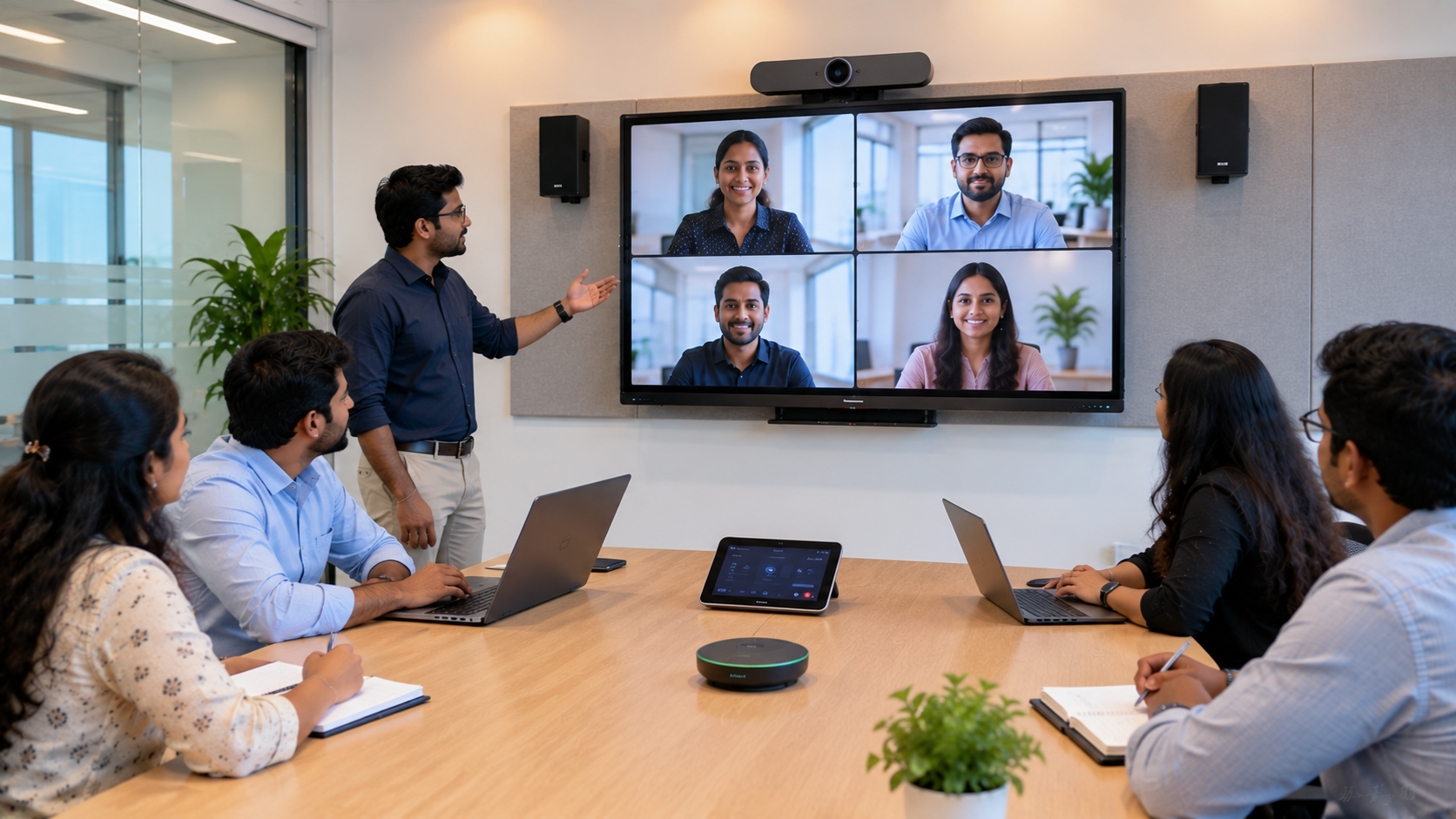
Hybrid meetings have become an essential part of modern business. Employees, clients, consultants and teams may be working from different offices, cities or even countries. A standard laptop webcam can handle a quick call, but professional meetings require better audio, video, room control and collaboration. That is where a Microsoft Teams Room (MTR) comes in. A Microsoft Teams Room transforms a conventional meeting room into a connected, professional collaboration space using Microsoft Teams, cameras, microphones, speakers, displays and a room-control interface. Microsoft supports Teams Rooms across different room sizes and offers certified devices designed for reliable audio, video and meeting experiences. For businesses in India, the right Microsoft Teams Room setup can make hybrid meetings easier to start, easier to manage and more productive.
What Is a Microsoft Teams Room?
A Microsoft Teams Room is a dedicated meeting-room solution designed to bring Microsoft Teams into a physical conference room.
Instead of connecting a personal laptop to a TV and manually configuring a webcam and microphone, a Teams Room creates an integrated meeting environment.
A typical setup can include:
Interactive display or professional meeting-room display
PTZ camera or intelligent conference camera
Conference microphones
Conference room speakers
Teams Rooms compute unit
Touchscreen room console
HDMI or wireless content-sharing system
Network and connectivity infrastructure
Microsoft also maintains a certification programme for Teams devices covering areas such as audio, video, user interface, security and reliability.
How Does Microsoft Teams Room Work?
The basic working principle is simple:
Teams software + certified room hardware + display + camera + audio + room control = connected hybrid meeting room.
1. Meeting is scheduled
A Teams meeting is scheduled through Microsoft Teams or Microsoft 365. The meeting-room account can be associated with the room's calendar.
2. Participants enter the meeting room
When users enter the room, the meeting can be accessed from the dedicated room console. Teams Rooms are designed to make joining meetings easier, including one-touch join functionality.
3. Camera captures the room
A conference or PTZ camera captures participants and sends the video to remote attendees.
For larger rooms, an appropriate camera such as an Evota 4K PTZ Camera, Evota 10X HD PTZ Camera or another compatible PTZ solution can provide flexible framing and professional video coverage.
4. Microphones capture voices
Conference microphones capture the voices of people in the room while speakers reproduce remote participants' audio.
The microphone and speaker selection should depend on room size, seating arrangement and acoustic conditions.
5. Display shows remote participants and content
A large interactive display or meeting-room screen allows participants to see remote attendees, presentations and shared content.
For collaborative environments, an Evota Interactive Panel, MAXHUB Smart Board, Newline Interactive Panel or suitable LG Interactive Panel can become an important part of the meeting environment.
Microsoft provides certified Teams Rooms hardware across different categories, including touch boards, cameras, speakers, microphones and compute systems.
6. Content is shared
Participants can share presentations, documents, applications or collaborative content with remote attendees.
This makes a Teams Room more than a video conferencing setup—it becomes a collaborative workspace.
Microsoft Teams Room vs Traditional Video Conferencing Setup
|
Feature |
Traditional Setup |
Microsoft Teams Room |
|---|---|---|
|
Meeting joining |
Manual |
Designed for simple room joining |
|
Camera |
Usually laptop/webcam |
Dedicated room camera |
|
Audio |
Laptop microphone |
Dedicated room audio |
|
Display |
TV/projector |
Professional meeting display |
|
Room control |
Multiple remotes/cables |
Dedicated room console |
|
Collaboration |
Basic |
Teams-integrated collaboration |
|
Hybrid meetings |
Limited |
Designed specifically for hybrid work |
|
Scalability |
Depends on equipment |
Available for different room sizes |
Microsoft describes Teams Rooms as solutions that can adapt to spaces ranging from smaller meeting areas to larger conference rooms.
Key Components of a Microsoft Teams Room
1. Interactive Display or Digital Board
An interactive flat panel display provides a large visual workspace for presentations, brainstorming and collaboration.
Depending on the application and budget, businesses can explore solutions such as:
Evota Interactive Flat Panel
MAXHUB Digital Board
Newline Digital Board
LG Interactive Digital Board
Eyeris Smart Board
Instead of choosing solely on digital board price, businesses should consider display size, touch performance, connectivity, warranty, installation and after-sales support.
2. PTZ Camera
A PTZ camera can be particularly useful for conference rooms where participants sit at different positions.
Options such as an Evota 4K PTZ Camera, Logitech PTZ camera or compatible conference camera can be selected according to room size and meeting requirements.
The right camera should provide suitable resolution, field of view, microphone compatibility and control features.
3. Conference Microphone and Speakers
Clear communication is essential.
A professional meeting room may require:
Conference microphone
Wireless microphone for larger rooms
Ceiling or table microphones
Conference room speakers
Echo and noise management
The goal is simple: remote participants should be able to hear people in the room clearly, and room participants should hear remote attendees without distortion.
4. Teams Room Console
The touchscreen console acts as the room's control interface.
Users can access scheduled meetings, join calls and control meeting functions without depending on a personal laptop.
5. Connectivity and Accessories
A reliable setup may also require HDMI connectivity, USB extension cables, video capture devices, network connectivity and other accessories.
GoLive eTechnologies can help businesses select the right combination instead of purchasing individual devices without considering compatibility.
Choosing the Right Microsoft Teams Room Setup in India
There is no universal configuration for every business.
A small huddle room may require a compact camera, display and audio solution, while a boardroom may require multiple microphones, a larger display and advanced camera coverage.
Consider:
Room size: How many people normally attend?
Display size: Is 65, 75, 86 inches or larger appropriate?
Camera coverage: Does the camera need PTZ functionality?
Audio: How far are participants from the microphone?
Collaboration: Do users need an interactive digital board?
Connectivity: Which laptops, HDMI devices and wireless-sharing solutions are used?
Installation: Is professional mounting, cabling and configuration required?
Microsoft's certified-hardware guidance also provides room-size recommendations for audio peripherals, reinforcing the importance of selecting equipment based on the physical meeting environment.
Microsoft Teams Room Pricing in India
The total Microsoft Teams Room price in India depends on the room size, display, camera, audio system, compute hardware, installation and software licensing.
Microsoft currently lists Teams Rooms Basic at no charge for eligible certified-device deployments, with a limit of 25 rooms, while Teams Rooms Pro is listed in India at ₹3,330 per room/month when paid yearly, with GST extra. Licensing and hardware costs should therefore be considered separately when preparing a project budget.
For businesses comparing interactive panel price, PTZ camera price, digital board price in India or complete conference-room setup costs, a project-based quotation is generally more useful than comparing individual product prices.
Why Choose GoLive eTechnologies for Teams Room Solutions?
A successful meeting-room deployment is about more than buying hardware.
GoLive eTechnologies follows an end-to-end approach—from selecting the right solution to installation and ongoing support.
Our approach focuses on:
Right technology for the room
Fast deployment
Professional installation
System configuration
User guidance and training
After-sales assistance
Responsive technical support
Our brand promise is simple:
Technology that works, backed by people who help.
Whether you need an Evota Smart Board, Evota 4K PTZ Camera, MAXHUB Smart Board, Newline Interactive Panel, LG Interactive Panel or a complete online teaching / hybrid classroom / conference room setup, the focus should remain on compatibility, performance and long-term usability.
Microsoft Teams Rooms for Businesses, Schools and Institutions
Teams Rooms can support a wide range of environments, including:
Corporate Offices
For board meetings, client presentations, team collaboration and hybrid meetings.
Training Rooms
Combine an interactive display, camera and audio equipment for instructor-led sessions.
Educational Institutions
Create smart classrooms and hybrid teaching environments with interactive displays and professional cameras.
Coaching Centres
A digital board for teaching combined with camera and audio equipment can support both in-person and online learners.
Boardrooms
Use large-format interactive displays, PTZ cameras, conference microphones and professional speakers for executive meetings.
The GoLive eTechnologies Advantage
Technology should reduce complexity—not create more of it.
GoLive eTechnologies helps customers evaluate their room requirements, choose appropriate products, coordinate installation and get the system operational.
That means less technology headache and more confidence that everything will work.
From selection to installation and beyond, our focus is on delivering the right solution, fast deployment and dependable support.
Final Takeaway
A Microsoft Teams Room is more than a camera connected to a screen. It is an integrated meeting-room environment designed to connect in-room and remote participants through Microsoft Teams.
With the right interactive display, PTZ camera, microphone, speaker, compute and room-control solution, organisations can create professional hybrid meeting spaces that are easier to use and manage.
If you are planning a Microsoft Teams Room setup in India, Delhi NCR or Noida, GoLive eTechnologies can help you build the right solution around your room, budget and use case.
Technology that works. Backed by people who help.
Your email address will not be published. Required fields are marked *

By Inhype • September 12, 2026
A smart classroom is only as effective as the technology supporting it. Interactive panels, smart boards, PTZ cameras, microphones, speakers, PCs and
Read More
By Inhype • September 12, 2026
Higher education is rapidly moving beyond traditional chalkboards and projectors. Today, colleges and universities need technology that supports inter
Read More
By Inhype • September 12, 2026
A smart classroom for CBSE schools is no longer simply a classroom with a digital board. Modern schools are building connected learning environments t
Read More
By Inhype • September 12, 2026
Planning a smart classroom project for 10, 20 or even 50 classrooms requires more than simply purchasing digital boards. Schools, colleges, universiti
Read More
By Inhype • September 12, 2026
A smart classroom can transform the way teachers explain concepts, students interact with lessons, and institutions deliver digital education. From in
Read More




Golive eTechnologies India Private Limited (CIN - U31909UP2021PTC148242) is one of India's leading providers of smart classrooms, interactive boards, video conferencing solutions, and display technologies for the education, healthcare, corporate, and government sectors.





















No comments yet. Be the first to comment!